The ModularUI2 port
GregTech's machine, multiblock, hatch, cover and item screens run on ModularUI2 in 2.9.0, where 2.8.4 used the first ModularUI. Most look and work as they did. A multiblock shows its maintenance state as a coloured wrench, and buttons a machine cannot use are greyed out. Some screens are still the old ones: most TecTech and GoodGenerator multiblocks, among them the Quantum Computer, Eye of Harmony, Microwave Grinder, YOTTank and Neutron Activator, plus the Circuit Assembly Line, Advanced Assembly Line, Quantum and Super Chests and GT++'s Power Substation. Machines whose port changed more than the look, such as the Mega Industrial Apiary, have entries of their own.
Hatches, buses and covers
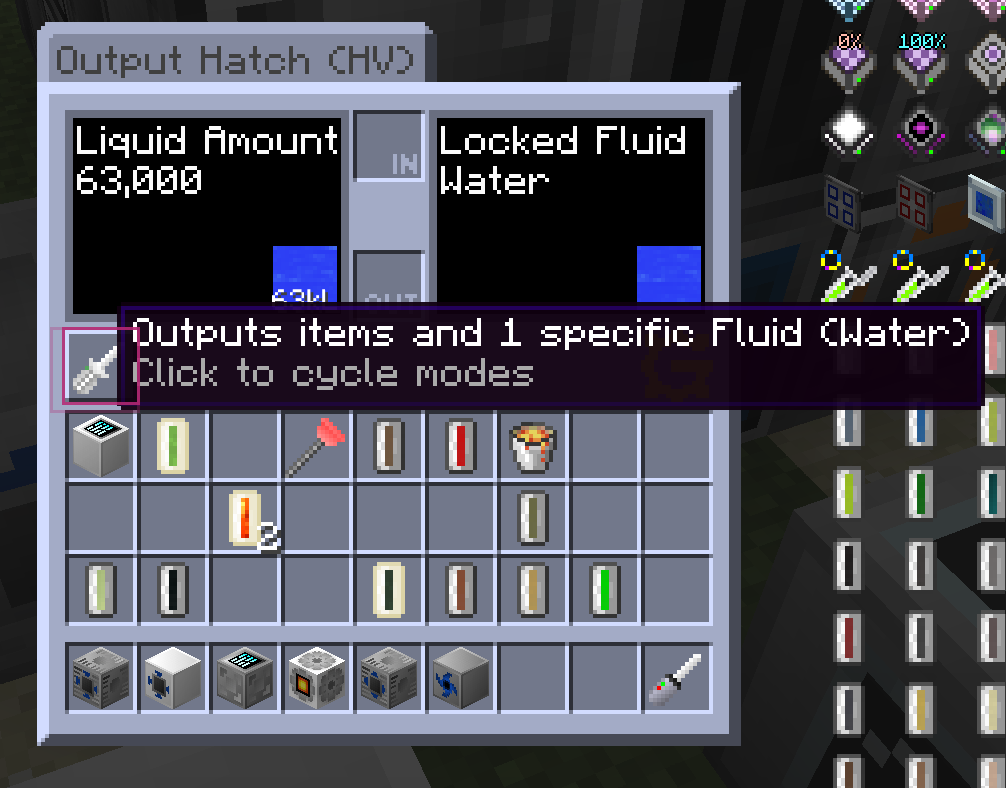
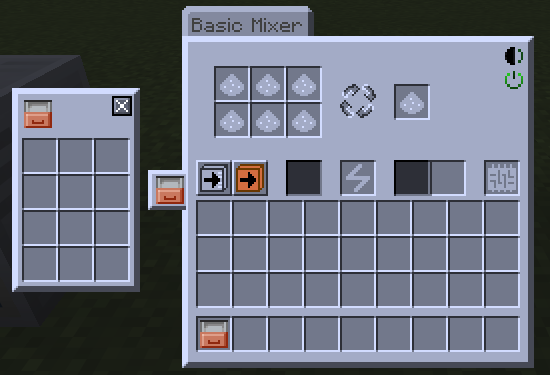
The Output Hatch has a mode button in its screen: click the screwdriver icon to cycle what the hatch outputs, and hover it to read the current mode. On Input and Output Hatches the small gauge between the IN and OUT slots fills with the stored fluid. Hovering the Computer Rack's heat icon shows its heat, and its power icon shows whether the rack is active. An Item Holder cover opened from a machine screen pops up beside its cover tab as a grid of slots.
The other hatch, bus and cover screens came across with the same slots and buttons in the ModularUI2 look: input and output buses, the ME stocking buses and hatches, the Crafting Input Buffer, the maintenance, laser, data, capacitor, rack, turbine and sensor hatches, and the redstone, wireless and detector covers.
Shipped in 43 pull requests
- [MUI2] Small Chisel Bus fixes (GT5-Unofficial #6964)
- [MUI2] Ported MTEHatchVoidBus to MUI2 (GT5-Unofficial #6899)
- [MUI2] Ported MTEHatchInput to MUI2 (GT5-Unofficial #6890)
- [MUI2] Ported MTEHatchSolidifier to MUI2 (GT5-Unofficial #6849)
- [MUI2] The great hatch refactor (GT5-Unofficial #6739)
- [MUI2] Ported MTEHatchOutput to MUI2 (GT5-Unofficial #6676)
- MUI2 Reactive Cover Popup (GT5-Unofficial #6619)
- [MUI2] Ported MTEHatchWirelessMulti to MUI2 (GT5-Unofficial #6419)
- [MUI2] Ported MTEHatchWirelessComputationInput to MUI2 (GT5-Unofficial #6416)
- [MUI2] Ported MTEHatchUncertainty to MUI2 (GT5-Unofficial #6386)
- [MUI2] Ported MTEHatchRack to MUI2 (GT5-Unofficial #6309)
- [MUI2] Ported MTEHatchSteamBusOutput to MUI2 (GT5-Unofficial #6283)
- [MUI2] Ported MTEHatchOutputME to MUI2 (GT5-Unofficial #6277)
- [MUI2] Ported MTEHatchOutputBusME to MUI2 (GT5-Unofficial #6275)
- [MUI2] Ported MTEHatchOutputBus to MUI2 (GT5-Unofficial #6270)
- [MUI2] Ported MTEHatchObjectHolder to MUI2 (GT5-Unofficial #6269)
- [MUI2] Ported MTEHatchMultiInput to MUI2 (GT5-Unofficial #6266)
- [MUI2] Ported MTEHatchMaintenance to MUI2 (GT5-Unofficial #6265)
- [MUI2] Small UI fix for MTEHatchEnergyDebug (GT5-Unofficial #6246)
- [MUI2] Ported MTEHatchInputME to MUI2 (GT5-Unofficial #6234)
- [MUI2] Ported MTEHatchInputBusME to MUI2 (GT5-Unofficial #6157)
- [MUI2] Port of MTEHatchInputBattery and MTEHatchOutputBattery (GT5-Unofficial #6025)
- [MUI2] Port MTEHatchCraftingInputME to MUI2 (GT5-Unofficial #5729)
- [MUI2] turbine hatch (GT5-Unofficial #5596)
- [MUI2] Chisel Hatch (GT5-Unofficial #5593)
- [MUI2] MTEHatchElementalDataOrbHolder.java (GT5-Unofficial #5591)
- [MUI2] MUI2 Laser Hatches (GT5-Unofficial #5583)
- [MUI2] Advanced Muffler Hatch (GT5-Unofficial #5581)
- [MUI2] Data Hatch (GT5-Unofficial #5580)
- [MUI2] Capacitor hatch (GT5-Unofficial #5578)
- [MUI2] port MTEHatchNbtConsumable to MUI2 (GT5-Unofficial #5366)
- [MUI2] port input bus to MUI2 (GT5-Unofficial #5318)
- Port Item Detector Cover to Mui2 (GT5-Unofficial #5019)
- Port ender fluid link cover gui to mui2 (GT5-Unofficial #5016)
- [MUI2] Port CoverAdvancedWirelessRedstoneBase and inheritors to mui2. (GT5-Unofficial #4571)
- [MUI2] pH Sensor Hatch (GT5-Unofficial #4416)
- imporve input bus gui (GT5-Unofficial #5635)
- Changed MessageFormat inside ME bus/hatch (GT5-Unofficial #6679)
- [MUI2] Ported MTELinkedInputBus to MUI2 (GT5-Unofficial #6174)
- [MUI2] Ported MTEBlackHoleUtility (GT5-Unofficial #6074)
- [MUI2] Port turbine holder (GT5-Unofficial #5582)
- [MUI2] Fluid Limiter GUI (GT5-Unofficial #4548)
- [MUI2] Heat Sensor (GT5-Unofficial #4380)
Machine and multiblock interfaces
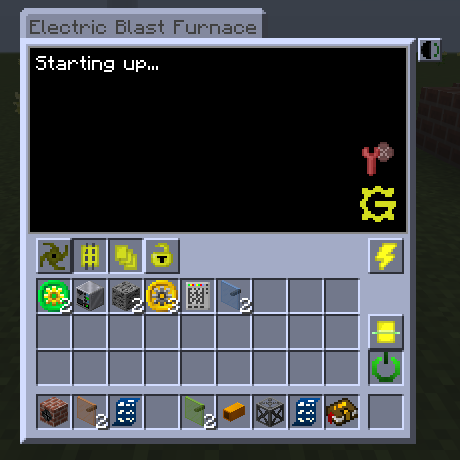
Most GregTech, GT++ and Bartworks multiblock controllers open on one layout: a black terminal with the machine's status and any structure errors, an icon in its corner whose tooltip says why the machine stopped (lost power, too damaged, switched off by hand), and the machine's buttons in a row beneath. For the first few seconds after a world loads the terminal reads Starting up... Buffers, filters, the Regulator, tanks, battery buffers, generators and the Teleporter open on the same widgets.
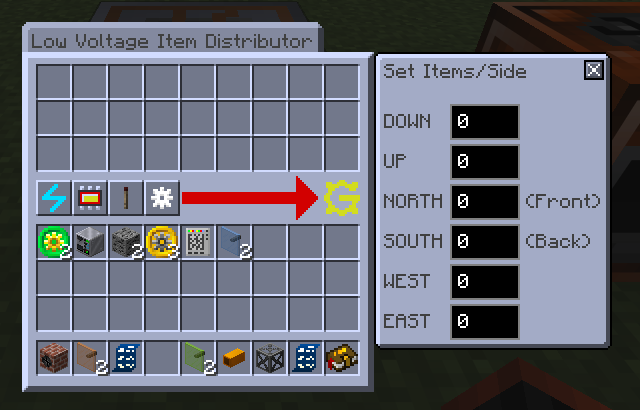
Some ports brought new controls. The Item Distributor has a gear button that opens Set Items/Side, a field from 0 to 127 for each of its six sides, so a side with a block against it can be set from the GUI. The Tesla Tower shows its output current as a bar and has buttons for an amperage-over-time chart and a heat map of the chunks around it. Steam machines have a pressure gauge beside the window whose tooltip gives the stored steam. A Pollution Scrubber switches between High and Low Efficiency with a button in its GUI.
A Pollution Scrubber whose Basic Turbine wears out now loses the turbine instead of its air filter. Double-clicking in the Extreme Industrial Greenhouse's GUI no longer crashes the game, and Esc in a Forge of the Gods upgrade window goes back to the upgrade tree.
check your build - GT5-Unofficial #5320. The steps are on the Before you update page.
Shipped in 62 pull requests
- [MUI2] Port MTEFusionComputer (GT5-Unofficial #7095)
- [MUI2] Ported MTEBetterJukebox (GT5-Unofficial #7053)
- [MUI2] Migrate KubaTechGTMultiBlockBase to MUI2 (EEC, EIG etc.) (GT5-Unofficial #6994)
- [MUI2] Migrate MTEDrillerBase to MUI2 (GT5-Unofficial #6987)
- [MUI2] Ported MTEBasicMachineBronze (GT5-Unofficial #6953)
- [MUI2] Ported MTEAutoChisel (GT5-Unofficial #6933)
- [MUI2] Added type parameter for MTEBasicMachineBaseGui (GT5-Unofficial #6932)
- [MUI2] Ported MTEAtmosphericReconditioner (GT5-Unofficial #6915)
- [MUI2] Ported MTESolarGenerator to MUI2 (GT5-Unofficial #6907)
- Enable MUI2 for naquadah fuel refinery (GT5-Unofficial #6904)
- [MUI2] Removed old MUI1 code from MTEBuffer line (GT5-Unofficial #6852)
- [MUI2] Ported MTETypeFilter to MUI2 (GT5-Unofficial #6626)
- [MUI2] Ported MTERecipeFilter to MUI2 (GT5-Unofficial #6625)
- [MUI2] Migrate Space Pump and Space Assembler (GT5-Unofficial #6620)
- [MUI2] Ported MTESpecialFilter to MUI2 (GT5-Unofficial #6613)
- [MUI2] Ported MTETeleporter to MUI2 (GT5-Unofficial #6527)
- [MUI2] Ported MTEFilter to MUI2 (GT5-Unofficial #6456)
- [MUI2] Ported MTEFilterBase to MUI2 (GT5-Unofficial #6444)
- [MUI2] Ported MTESuperBuffer to MUI2 (GT5-Unofficial #6442)
- [MUI2] Ported MTEChestBuffer to MUI2 (GT5-Unofficial #6441)
- [MUI2] Ported MTEItemDistributor to MUI2 (GT5-Unofficial #6440)
- [MUI2] Small fixes in MTEBufferBaseGui (GT5-Unofficial #6439)
- [MUI2] Ported MTERegulator to MUI2 (GT5-Unofficial #6438)
- [MUI2] Moved charger slot creation from MTEBasicMachineWithRecipeBaseGui to parent class (GT5-Unofficial #6432)
- [MUI2] Ported MTEBuffer to MUI2 (GT5-Unofficial #6426)
- migrate Mega Apiary to MUI2 and fix NEI filter (GT5-Unofficial #6288)
- [MUI2] Ported MTEDebugStructureWriter to MUI2 (GT5-Unofficial #6250)
- [MUI2] Ported MTEDebugPowerGenerator to MUI2 (GT5-Unofficial #6249)
- [MUI2] Ported MTEDebugPollutor to MUI2 (GT5-Unofficial #6248)
- [MUI2] Ported MTEBuckConverter to MUI2 (GT5-Unofficial #6247)
- [MUI2] Ported MTEBasicGenerator to MUI2 (GT5-Unofficial #6235)
- [MUI2] Ported MTETieredTank to MUI2 (GT5-Unofficial #6230)
- [MUI2] Finished port of MTEDigitalTankBase to MUI2 (GT5-Unofficial #6212)
- [MUI2] Ported MTEBasicTank to MUI2 (GT5-Unofficial #6178)
- [MUI2] Ported MTETieredMachineBlock to MUI2 (GT5-Unofficial #6175)
- [MUI2] Port of MTEBasicBatteryBuffer (GT5-Unofficial #6029)
- [MUI2] Port Space Miner Module GUI (GT5-Unofficial #5597)
- [MUI2] Water Purification Plant (GT5-Unofficial #5568)
- Clean up dead code in boilers from MUI2 port (GT5-Unofficial #5560)
- [MUI2] Port Electric Auto Workbench to MUI2 (GT5-Unofficial #5424)
- [MUI2] Port Godforge modules to MUI2 (GT5-Unofficial #5423)
- [MUI2] Port Godforge to MUI2 (GT5-Unofficial #5414)
- [MUI2] port LMA to mui2 (GT5-Unofficial #5343)
- [MUI2] Cleanroom MUI (GT5-Unofficial #5333)
- [MUI2] Port LSC to MUI2 (GT5-Unofficial #5332)
- [MUI2] fix bug when player invent is not bound in mtebasegui (GT5-Unofficial #5331)
- [MUI2] create base class for MTESingleBlock (GT5-Unofficial #5330)
- [MUI2] port Drone Centre to MUI2 [check your build] (GT5-Unofficial #5320)
- [MUI2] port MTELargeFluidExtractor to MUI2 (GT5-Unofficial #5277)
- [MUI2] port MTETranscendentPlasmaMixer to MUI2 (GT5-Unofficial #5276)
- [MUI2] port MTEPurificationUnitBase to MUI2 (GT5-Unofficial #5275)
- [MUI2] port MTEPreciseAssembler to MUI2 (GT5-Unofficial #5274)
- [MUI2] port MTEPlasmaForge to MUI2 (GT5-Unofficial #5273)
- [MUI2] Port MTENanoForge to MUI2 (GT5-Unofficial #5272)
- [MUI2] port MTEPCBFactory to MUI2 (GT5-Unofficial #5271)
- Enable mui2 for multiblocks that do not need additional buttons/text (GT5-Unofficial #5101)
- [mui2] Add startup text to multiblocks (GT5-Unofficial #5100)
- [MUI2] MTEMultiBlockBaseGui cleanup (GT5-Unofficial #4581)
- [MUI2] Port AntimatterGenerator/S.L.A.M to MUI2 (GT5-Unofficial #4561)
- [MUI2] Port AntimatterForge/S.S.A.S.S to mui2 (GT5-Unofficial #4551)
- Mui2 tesla tower (GT5-Unofficial #5238)
- Adapt to breaking mui2 changes (GT5-Unofficial #5058)
Item and single-block screens
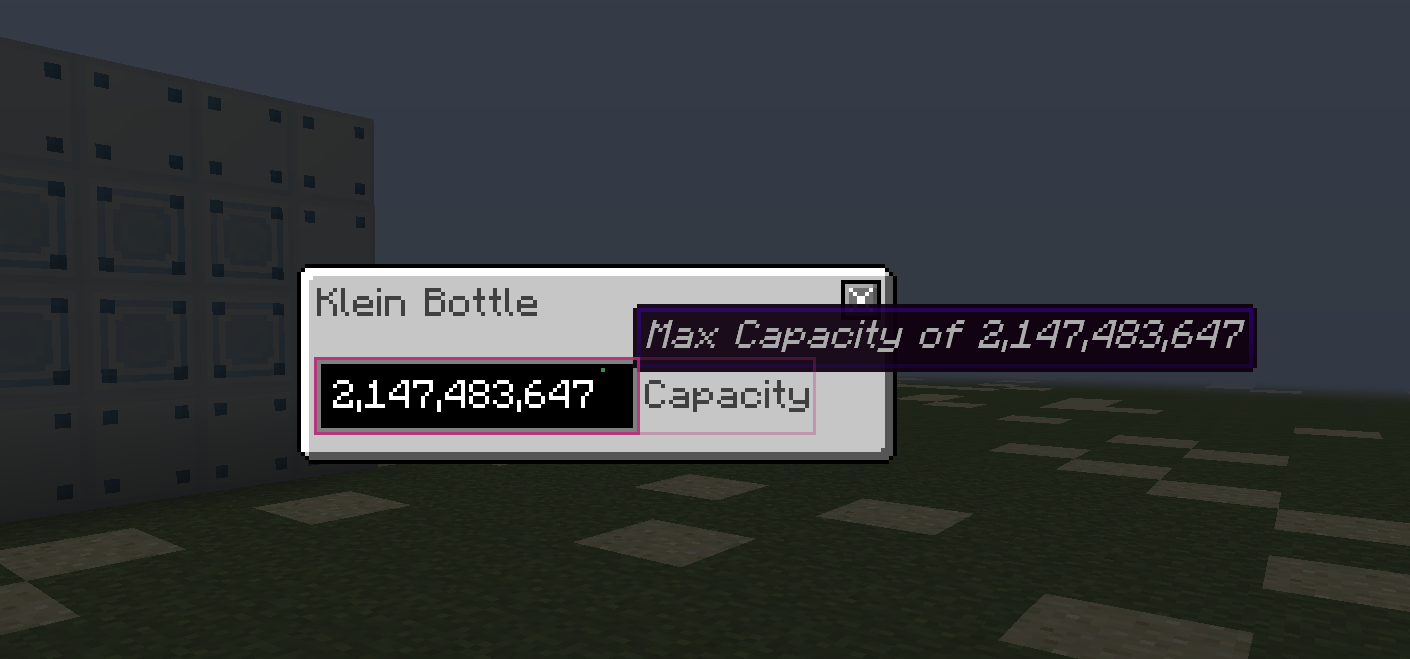
The Volumetric Flask's capacity window has no Confirm button: type the capacity and press Enter, and hover the field to see the flask's maximum. The Integrated Circuit and the Volumetric Flask open their screens from the offhand as well as the main hand.
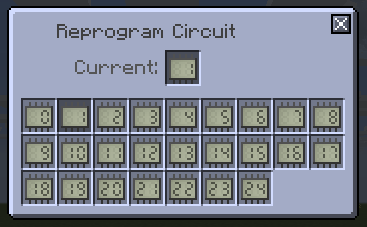
Single-block machine screens, the Boxinator, Miner, Pump, Rock Breaker, Scanner, Replicator and BioLab among them, kept their slots and buttons in the ModularUI2 look. So did the Integrated Circuit's circuit picker, the Circuit Programmer and the Infinite Spray Can's colour picker.
Shipped in 11 pull requests
- [MUI2] Added error widget to singleblock machines (GT5-Unofficial #7086)
- MUI2: Port non-recipe map SB machines to MUI2 (GT5-Unofficial #6729)
- [MUI2] Ported ItemCircuitProgrammer to MUI2 (GT5-Unofficial #6522)
- [MUI2] Finished port of ItemIntegratedCircuit to MUI2 (GT5-Unofficial #6496)
- [MUI2] Finished port of the Infinite Spray Can to MUI2 (GT5-Unofficial #6494)
- [MUI2] (Re)Ported ItemVolumetricFlask to MUI2 (GT5-Unofficial #6477)
- [MUI2] port BasicMachineWithRecipe to MUI2. (GT5-Unofficial #5478)
- port / replace mui1 implementation of ItemVolumetricFlask to mui2 (GT5-Unofficial #5242)
- Port SB machines to MUI2 (not including crop manager) (CropsNH #134)
- [MUI2] Ported MTEBioLab (GT5-Unofficial #7054)
- fix high pressure steam sb progression tt (GT5-Unofficial #7965)
Maintenance wrench, greyed-out buttons and TecTech parameters
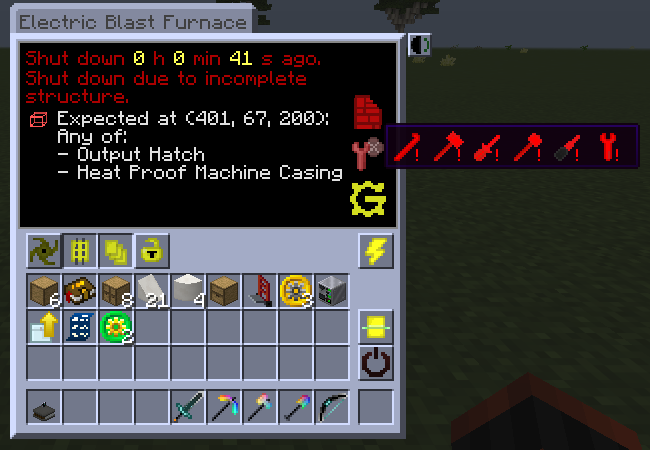
A multiblock's screen shows its maintenance state as a wrench in the bottom-right corner: green with no problems, yellow with some, red with all six. Hovering it shows an icon for each tool still needed, where 2.8.4 printed one line per problem such as "Pipe is loose. (Wrench)". On single-block machines the fluid or item auto-output button is greyed out when the machine has no output slots of that kind, and its tooltip says so.
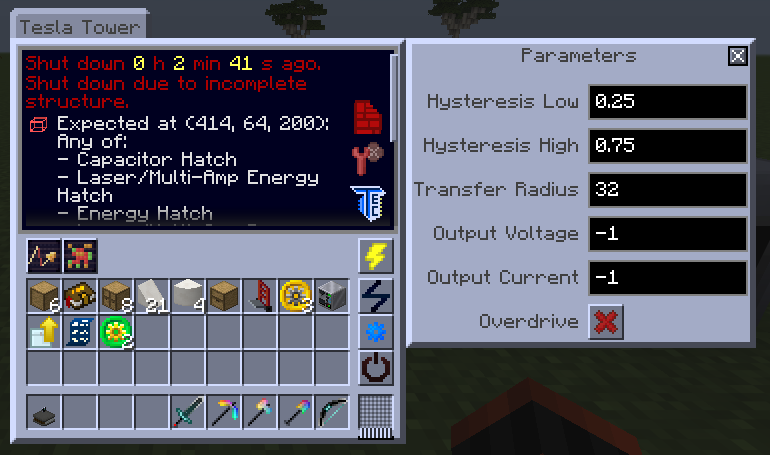
TecTech multiblocks on the new screens keep their settings as named fields in a Parameters panel, opened with the Edit Parameters button: the Tesla Tower, the Space Assembler, Pumping and Mining Modules, and the BEC machines. The Parametrizer Memory Card copies and pastes those fields, and the Mining Module's ore filter with them. It no longer does anything on TecTech multiblocks still on the old screens, such as the Quantum Computer and the Microwave Grinder.
Resource packs can recolour the numbers and status text in GregTech screens through the displayTextWhite and displayTextGray theme entries.
read before updating - GT5-Unofficial #6602. The steps are on the Before you update page.
Shipped in 30 pull requests
- [MUI2] Added better slot and stack limitation (GT5-Unofficial #7124)
- [MUI2] Better Gui Slot Filtering (GT5-Unofficial #7116)
- [MUI2] Fixed progress bar themes registering with the wrong class (GT5-Unofficial #7103)
- [MUI2] Added Disabled Button Themes (GT5-Unofficial #7048)
- Redo Unlocalized MUi2 themes (GT5-Unofficial #6962)
- [MUI2] Unified logo creation (GT5-Unofficial #6939)
- Move from deprecated MUI2 methods to new ones with fixes for TextFieldWidget (GT5-Unofficial #6887)
- [MUI2] Unified ghost circuit and shape slot backend (GT5-Unofficial #6848)
- [MUI2] Reworked SettingsPanel, added Parameter compatibility (GT5-Unofficial #6841)
- [MUI2] Client to Server sync changes (GT5-Unofficial #6757)
- [MUI2] Parameter overhaul for TT multis, ported parametrizer card [read before updating] (GT5-Unofficial #6602)
- [MUI2] Refactored ALL deprecated MUI2 code (GT5-Unofficial #6412)
- [MUI2] Added missing button backgrounds for void miner filter panel (GT5-Unofficial #6361)
- [MUI2] Upstream sync fixes (GT5-Unofficial #6321)
- [MUI2] Added power and muffler button disables (GT5-Unofficial #6090)
- [MUI2] changes the base gui classs maintenance issue hoverable textures. (GT5-Unofficial #5749)
- [MUI2]: Move title widget code to CommonWidgets (GT5-Unofficial #5461)
- [MUI2] fix bug with title widget (GT5-Unofficial #5453)
- [MUI2] add overridiable textbox gap (GT5-Unofficial #5353)
- [MUI2] Change PanelGap height to make it looks like MUI1-Machines (GT5-Unofficial #5337)
- [MUI2] create a common widgets class (GT5-Unofficial #5328)
- [MUI2] Standardize area in codebase for mui2 (GT5-Unofficial #5109)
- [MUI2] Add recipe display widgets (GT5-Unofficial #5089)
- Enable the MUI2 switch (GT5-Unofficial #5023)
- Port MUI1 fluid util classes to MUI2 (ModularUI2 #74)
- Added new widget theme to be used on unlocalized values (GT5-Unofficial #6318)
- Sync upstream (ModularUI2 #47)
- Sync upstream (ModularUI2 #44)
- Sync upstream (ModularUI2 #43)
- add gui theme colorization for mui2 (it has to be done this way sorry) (GT5-Unofficial #5411)
Contributors
Everyone who authored, reviewed or co-authored a change on this page, with how many of them:
@Dream-Master (86), @chrombread (77), @TheYoingLad (77), @UltraProdigy (33), @FrostyFire1 (24), @YannickMG (23), @serenibyss (21), @Luca-Guettinger (18), @Spicierspace153 (18), @Ranzuu (8), @tiffit (7), @EnderProyects (4), @miozune (4), @brachy84 (3), @cubefury (3), @Miklebe (3), @RecursivePineapple (3), @Alexdoru (2), @boubou19 (2), @C0bra5 (2), @ghzdude (2), @Nockyx (2), @ABKQPO (1), @AnsonYeung (1), @danyadev (1), @FourIsTheNumber (1), @Guvante (1), @Kogepan229 (1), @LazyFlesh (1), @marisathewitch (1), @Nana-Sakura (1), @NotAPenguin0 (1), @PLASMAchicken (1), @purebluez (1), @RealSilverMoon (1), @Ruling-0 (1), @SST-03 (1), @SuperSoupr (1), @VortexSo4 (1)