Applied Energistics and its addons
The storage and autocrafting stack, which is where a GTNH base spends most of its attention. AE2 moved through close to 400 builds this release and its fluid addon over a hundred more, so this is the largest body of work in the pack after GregTech itself: interface terminals, storage buses, level emitters, pattern handling and the crafting CPU.
Universal GUI: items, fluids and essentia in one terminal
One ME Terminal shows items, fluids and essentia together, with a toggle for each. The same universal slots run through the pattern terminal and most of AE2's other screens.
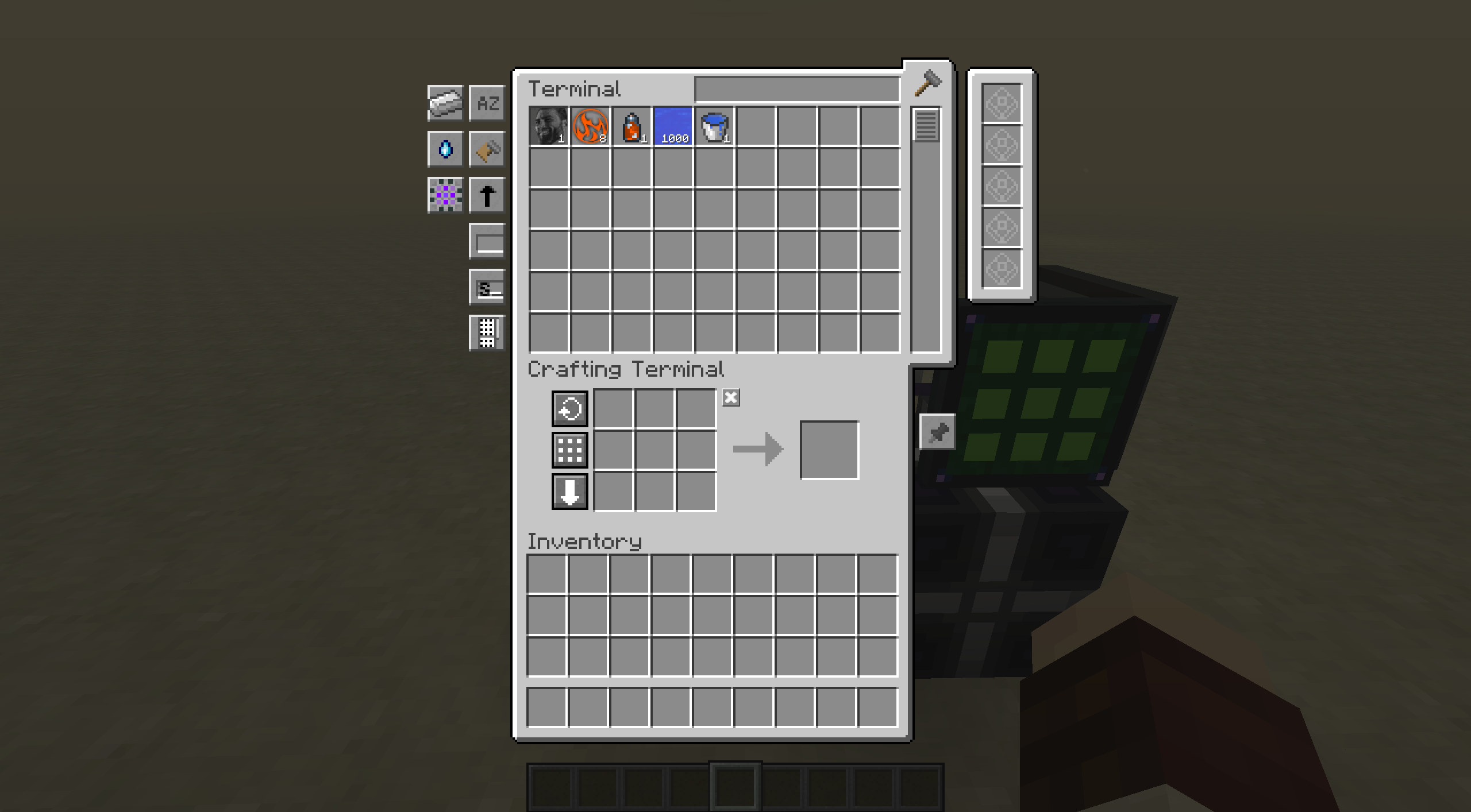
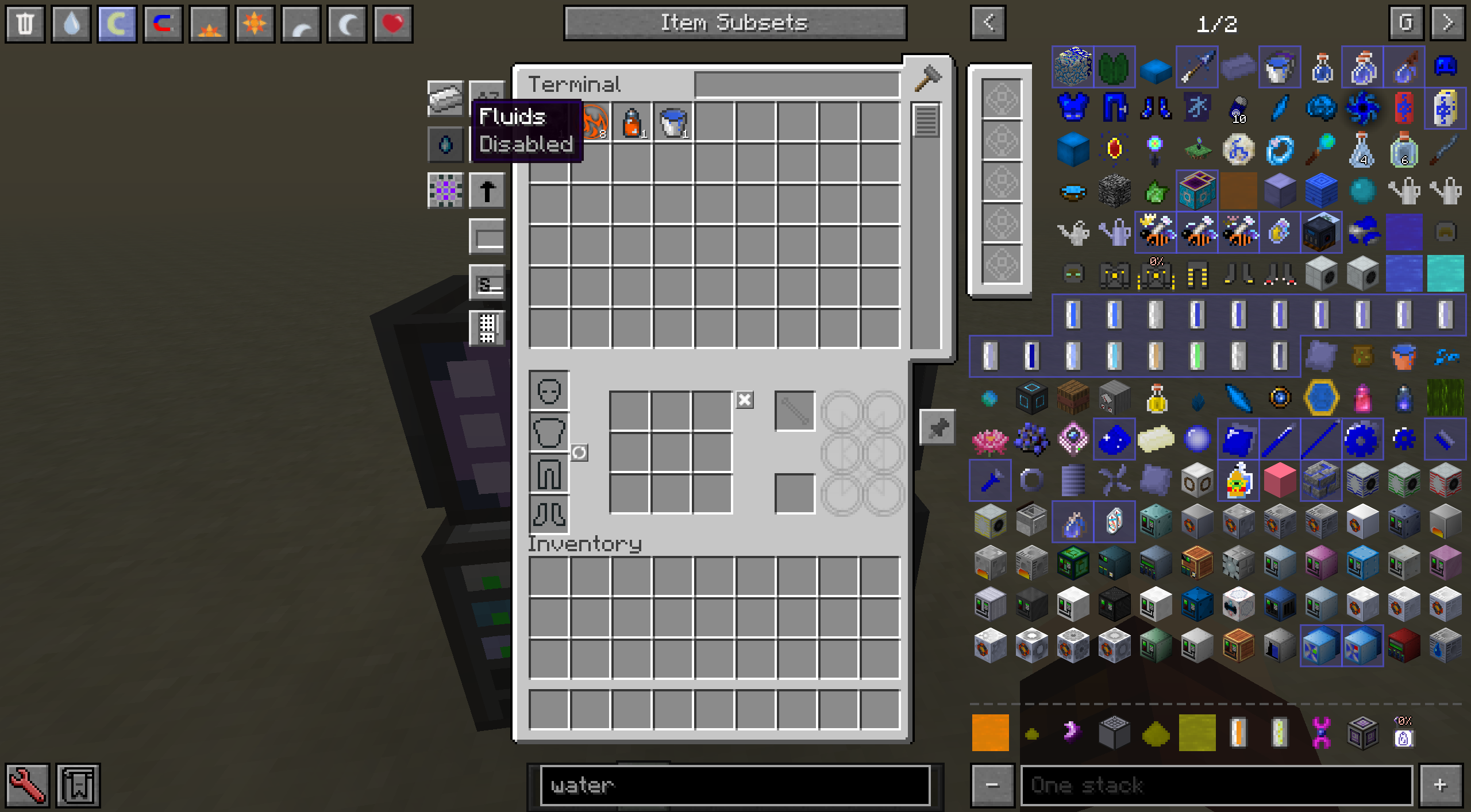
The specialised terminals the addons used to supply are gone with it. AE2FluidCraft's fluid terminals, fluid pattern terminals, Fluid Level Emitter and fluid monitors are removed. ThaumicEnergistics' Essentia Terminal, Wireless Essentia Terminal, Essentia Level Emitter, essentia monitors and Essentia Cell Workbench give way to the ordinary AE2 ones. What you have placed or carry is converted to the matching AE2 part, block or wireless terminal when it loads, but a pattern encoded with essentia has to be re-encoded by hand. Essentia is its own kind of stack now rather than a fluid-and-item hack, so it no longer leaks into fluid tanks through a fluid storage bus. Underneath is a Stack Type API an addon registers its own kind of stack with.
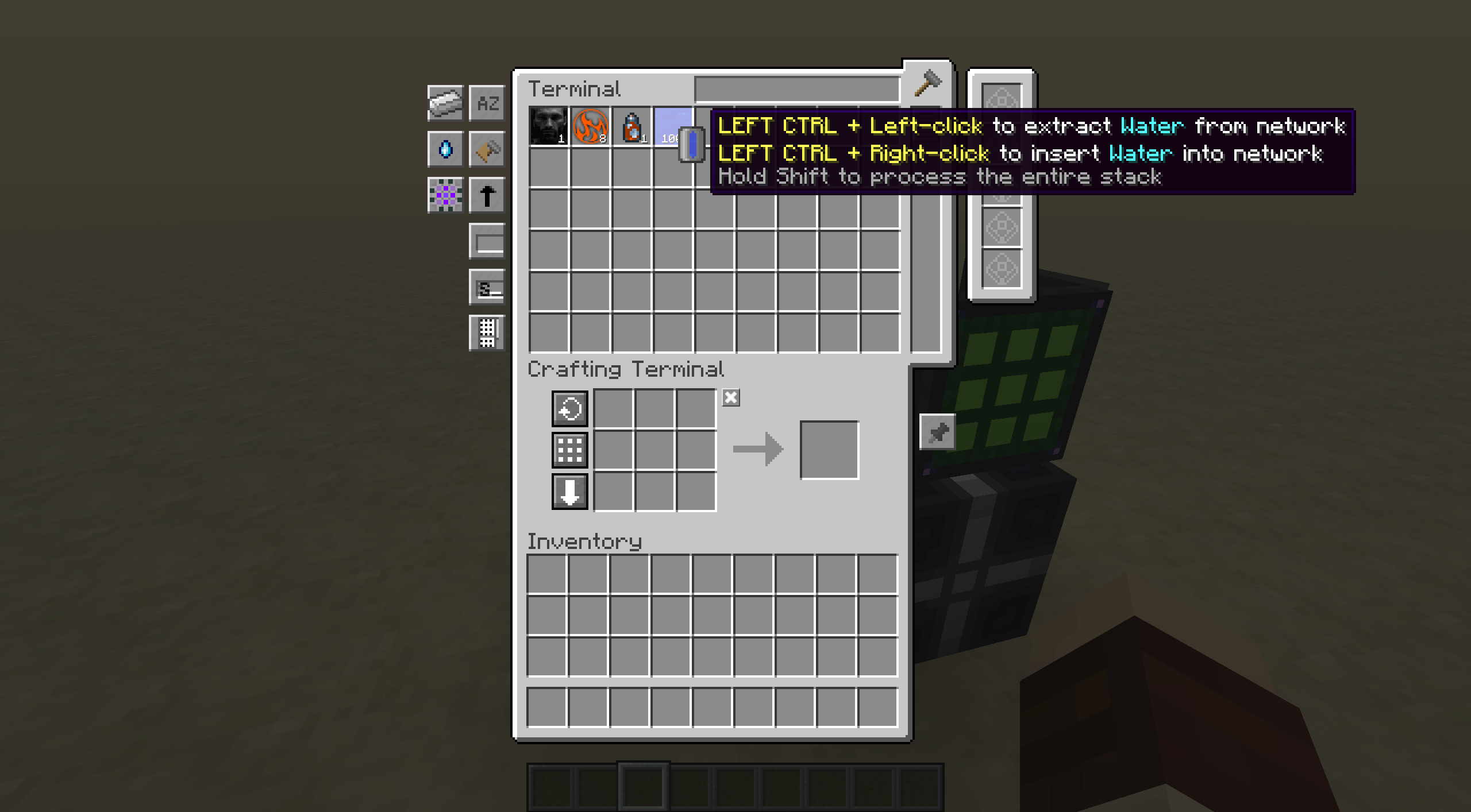
Container Item Interaction, Left Ctrl by default, empties a container into the network or fills it from the network.
items disappear - ThaumicEnergistics #98, and 1 other change(s) here need attention. The steps are on the Before you update page.
Shipped in 10 pull requests
- Universal GUI (Applied-Energistics-2-Unofficial #872)
- Stack Type API (Applied-Energistics-2-Unofficial #958)
- Add legacy type detection for level emitters (Applied-Energistics-2-Unofficial #1137)
- Fix alt type storage bus not able read subnet (Applied-Energistics-2-Unofficial #1154)
- Postea ae2fc and ThE deprecated (Applied-Energistics-2-Unofficial #1275)
- postea Essentia Cell Workbench (Applied-Energistics-2-Unofficial #1277)
- Universal GUI [check your build] (AE2FluidCraft-Rework #340)
- remove (AE2FluidCraft-Rework #433)
- Native Essentia [items disappear] (ThaumicEnergistics #98)
- ExtraCells2 compatibility (ThaumicEnergistics #105)
Watch on Discord - 1 video clip(s)
Fluids are a stack type like any other
Fluids are no longer turned into Fluid Drops: the crafting calculator, crafting CPUs and patterns handle fluids directly. The Fluid Discretizer is gone. A drop left over from before turns back into fluid in an ME Fluid Packet Decoder. View Cells filter fluids and essentia as well as items.
Shipped in 14 pull requests
- Adapt crafting calculator & crafting cpu & patterns for work with fluid directly (Applied-Energistics-2-Unofficial #752)
- View Cell supports all stack types (Applied-Energistics-2-Unofficial #1069)
- Allow network to network exotic stack transfer (Applied-Energistics-2-Unofficial #1077)
- Changes Level Type Tooltip To Include Fluid (Applied-Energistics-2-Unofficial #986)
- Disassemble cells (Applied-Energistics-2-Unofficial #1271)
- Make pattern info more unviversal (Applied-Energistics-2-Unofficial #1116)
- Compatibility with ae native fluid (AE2FluidCraft-Rework #293)
- Adapt to AE2 Stack Type API changes (AE2FluidCraft-Rework #375)
- Legacy stack type (AE2FluidCraft-Rework #416)
- Allow decode drops into fluid (AE2FluidCraft-Rework #430)
- Add fluid packet description (AE2FluidCraft-Rework #429)
- Allow using inverter card on fluid cells (AE2FluidCraft-Rework #388)
- Make Fluid Cells storable in Item Cells again (AE2FluidCraft-Rework #441)
- Change Artificial Universe Fluid Cell to 63 Types (AE2FluidCraft-Rework #392)
Lite Crafting Mode
Lite Crafting Mode is a high-speed crafting calculation mode for late-game AE2 systems. It works by calculating the recipe in DAG order. However, it comes with some limitations. It ignores Ore Dictionary substitutions and ingredient substitutions, uses only one pattern per item whatever its priority, and does not count an ingredient that a pattern gives back, so a plan that relies on any of these comes out wrong. Patterns with multiple output is treated as separate patterns during calculation currently and this may cause extra ingredient to be calculated. The toggle is in the crafting amount screen, and the Network Details screen, opened with a Network Tool, sets a default for the whole network. The Level Maintainer can override that default from its own GUI. We recommend turning this setting on when you use the Level Maintainer to craft complex ingredients.
Shipped in: Applied-Energistics-2-Unofficial #1438, Applied-Energistics-2-Unofficial #1541, Applied-Energistics-2-Unofficial #936, AE2FluidCraft-Rework #463
Placing parts where you point
Cable placement now predicts on the client-side. They no longer have delay proportional to your ping and always place immediately like other blocks in the game. Various issue with regard to AE2 part placements are also fixed in the meantime.
Holding a cable, bus, terminal or other part draws a wireframe outline of where it will go, white if it fits and red if it does not; previewBlocks in the client config turns it off.
In survival, a new AE2 Pick Block keybind, unbound by default, puts a stack of the block you are looking at in your hand, taken from the ME system through a wireless terminal in your inventory or a Baubles slot. If the network has none but can craft it, the crafting amount screen opens instead. OpenComputers robots can place AE2FluidCraft's multiparts.
Shipped in: Applied-Energistics-2-Unofficial #1402, Applied-Energistics-2-Unofficial #935, Applied-Energistics-2-Unofficial #945, Applied-Energistics-2-Unofficial #1661, Applied-Energistics-2-Unofficial #969, AE2FluidCraft-Rework #412, Applied-Energistics-2-Unofficial #1618, Applied-Energistics-2-Unofficial #1654
Crafting CPUs say what they are waiting for
A crafting CPU says why each remaining operation is waiting. An operation held up at an interface is tinted by the reason: amber when the target is full or will not take the ingredients, red when there is no target, when the target is on the same network, or when nothing there accepts that kind of stack. The red reasons share an icon, and blocking mode and lock mode each have their own.
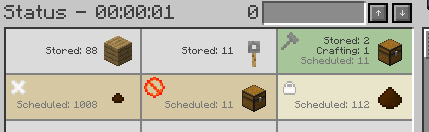
The tooltip names the reason, missing ingredients included, without holding shift.
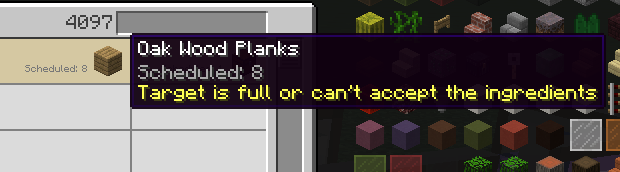
A job can be paused with the Suspend button and resumed later. A job you follow ends with an achievement-style popup as well as the chat line. Hovering a CPU in the CPU list shows which requests it accepts: all, only from players, or only from non-players.
Shipped in 14 pull requests
- Add scheduled-reason colors and icons to crafting CPU remaining operations (Applied-Energistics-2-Unofficial #1151)
- Improve scheduled reason tooltips (Applied-Energistics-2-Unofficial #1180)
- Add Improve Tooltip CPU (Applied-Energistics-2-Unofficial #937)
- Add a describe tooltips for cpu allow crafting request from where (Applied-Energistics-2-Unofficial #921)
- Changed button tooltip from "No crafting Job Active" to "Inactive" (Applied-Energistics-2-Unofficial #1216)
- Crafting cpus improvements (Applied-Energistics-2-Unofficial #1481)
- Changed styling of CPU Selectro GUI (Applied-Energistics-2-Unofficial #1257)
- Pixel Adjustments/MissingItem overlay adjustments (Applied-Energistics-2-Unofficial #1173)
- Suspend cpus (Applied-Energistics-2-Unofficial #865)
- Order from cpu screen only active stack size (Applied-Energistics-2-Unofficial #1367)
- some refactor in cpu (Applied-Energistics-2-Unofficial #1053)
- Add getTile cache (Applied-Energistics-2-Unofficial #1124)
- Do not retry if getTile reflection fails (Applied-Energistics-2-Unofficial #1125)
- Add Crafting Complete Notification Popup (Applied-Energistics-2-Unofficial #1048)
Item Flow Tracking
A network can be told to keep count of how much of every item and fluid its machines moved in and out over the last two minutes. The toggle is Item Flow Tracking on the Network Details screen, opened with a Network Tool, and the window is set in the AE2 config. While it runs, the terminal tooltip of an item that moved both ways reads Flow (2m): +24 / -30 Net -6.
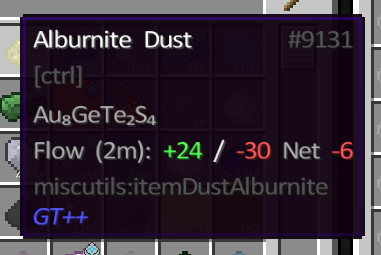
A new Flowing Items view mode lists only what is moving. A keybind, unbound until you set it in Controls, highlights every block that item came from in green and every block it went to in red, with the amount above the block and the coordinates in chat. That is how you find what has been draining a stack a second.
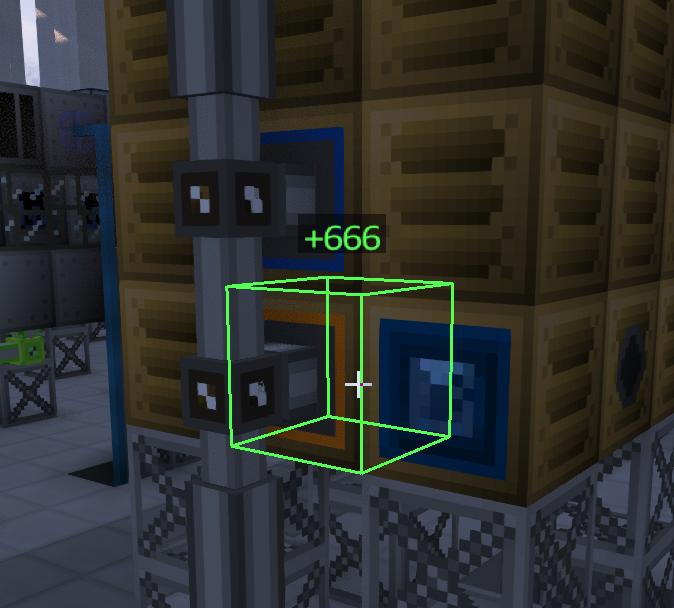

The numbers are totals over the window and not a rate per tick, because a rate that swings every tick tells you nothing.
Shipped in: Applied-Energistics-2-Unofficial #1376
The Crafting Diagnostic Terminal
The ME Crafting Diagnostic Terminal lists every item your crafting CPUs have made and how long it took: the quantity, the time and the average per second. A Sort By button cycles the order through those columns, and a search filters the list by name. It records nothing until Crafting Diagnostics is switched on for the network on the Network Details screen, opened with a Network Tool.
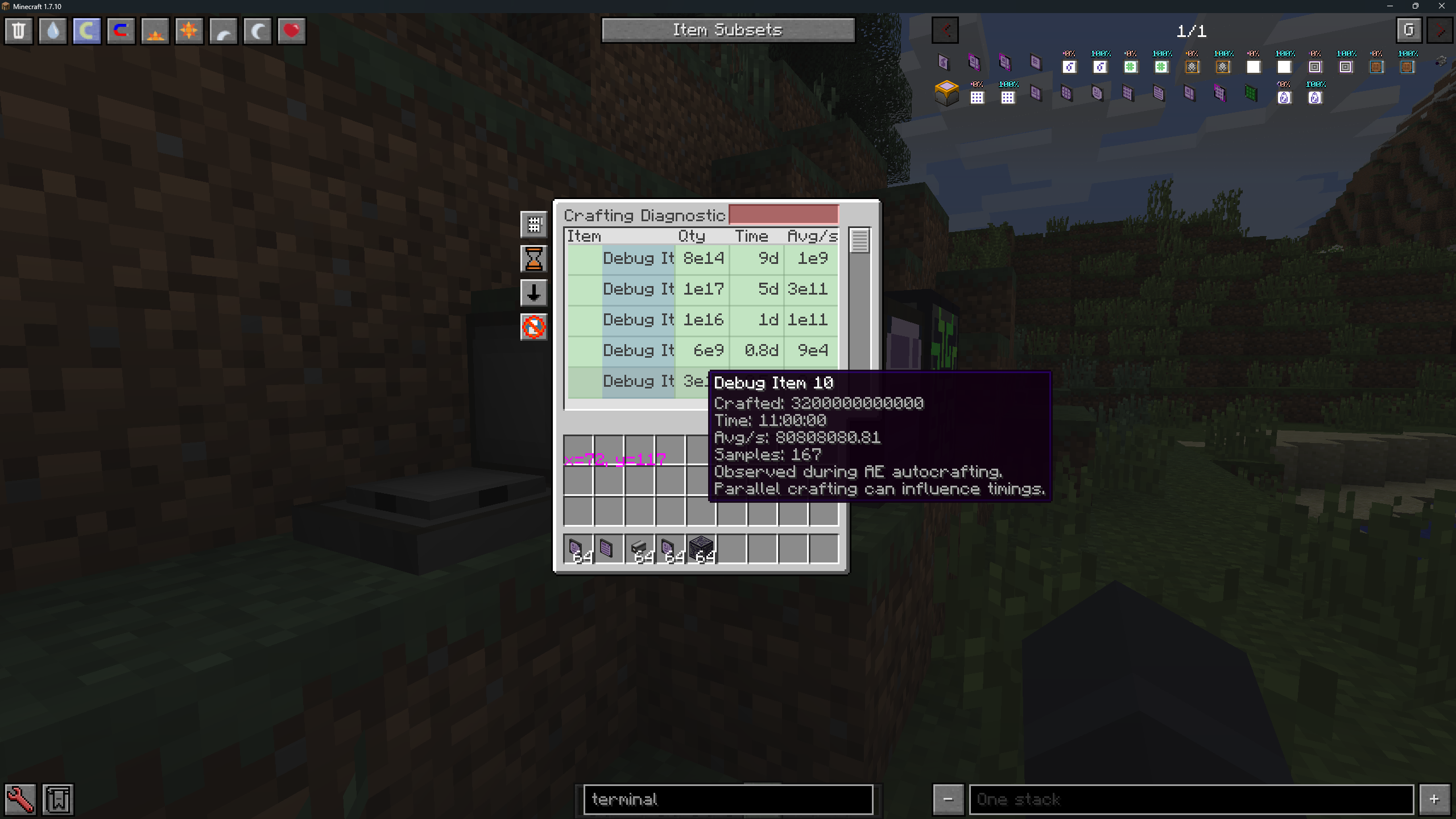
A double-click on the reset button clears everything, and Ctrl and a double-click on a row clears that item. Parallel crafting moves the timings around, and the tooltip says so rather than pretending otherwise.
Shipped in: Applied-Energistics-2-Unofficial #1210
Reading a crafting plan
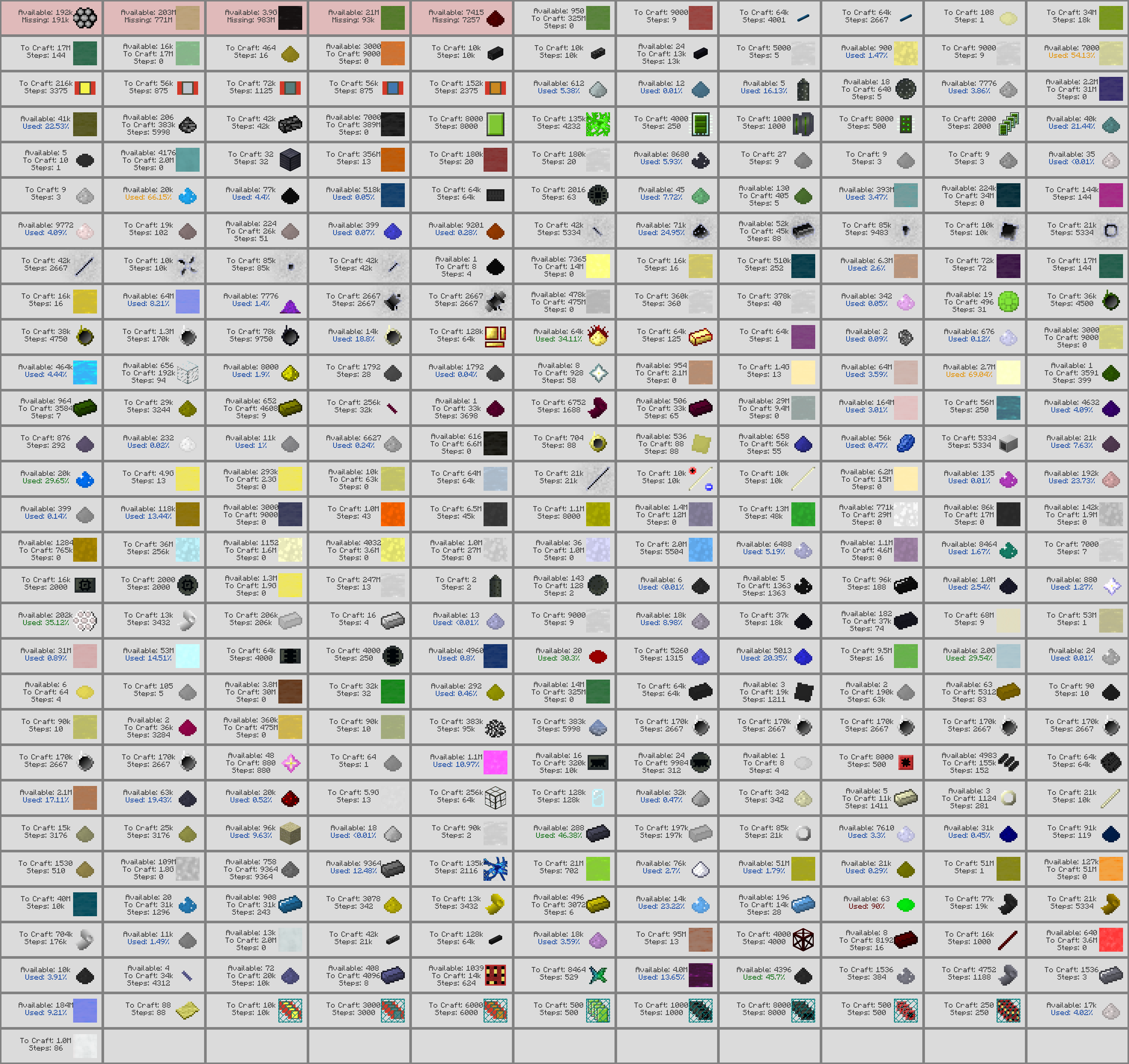
Clicking a tile in the crafting tree folds its branch away, marked with a +, and clicking it again opens it, so a plan with hundreds of steps can be read one branch at a time. A missing ingredient is drawn in red, every step it holds up in yellow, and the lines between them in the same colours. Hide all available folds every branch that lacks nothing, leaving only the path to what is missing. The plan list can be saved as a picture the way the tree already could, with the columns laid out so the result is not one item wide or one item tall.
Shipped in: Applied-Energistics-2-Unofficial #892, Applied-Energistics-2-Unofficial #775, Applied-Energistics-2-Unofficial #1616
The Pattern Repeater
The ME Pattern Repeater lets one ME network craft with the patterns stored on another.
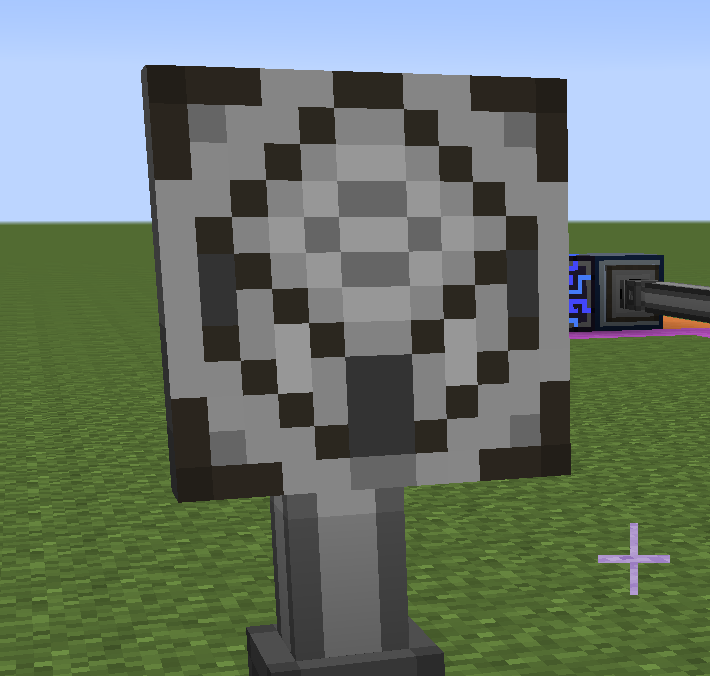
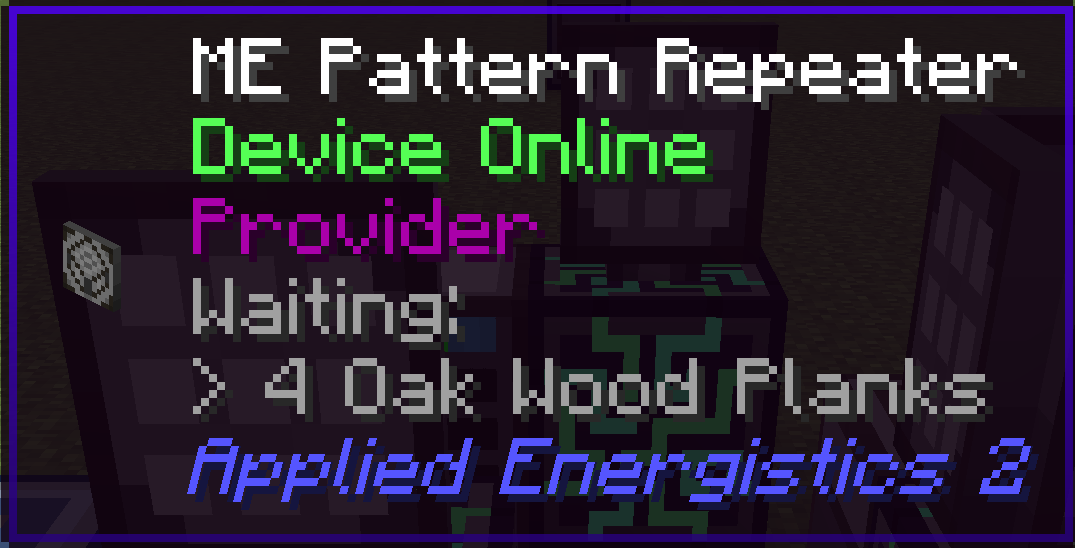
Repeaters work in pairs, placed face to face, one on each network. A wrench switches a repeater between Accessor, the default, and Provider. The Provider's network sees every pattern on the Accessor's network and sends those crafts through the pair, and only the outputs it is waiting for come back to it. A Level Emitter in crafting mode on the far network can be requested across the pair too.
Shipped in: Applied-Energistics-2-Unofficial #1000, Applied-Energistics-2-Unofficial #1418
Advanced Level Emitter
A new variant of the ME Level Emitter watches six items or fluids at once, each slot with its own threshold, its own comparison direction and its own on/off switch.
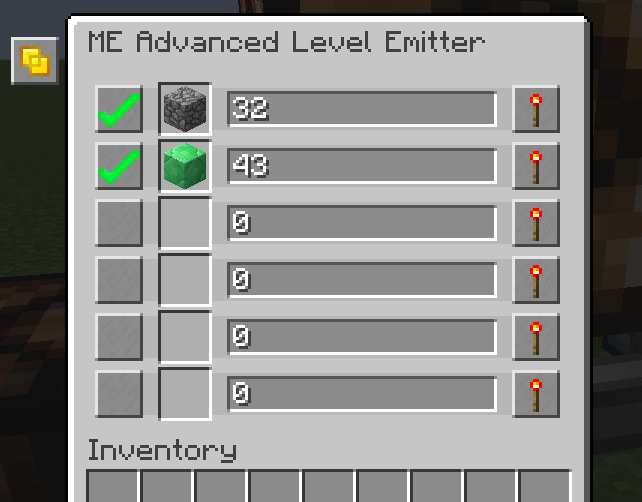
One AND/OR setting combines the active slots: AND emits when all of them match, OR when any does. That replaces several emitters and redstone gates. Slots start switched off, and the emitter takes no upgrade cards, so it has no crafting or fuzzy mode.
Shipped in 11 pull requests
- Add Advanced Level Emitter (Applied-Energistics-2-Unofficial #1455)
- Allows open the Level Emitter GUI from Level Terminal (AE2FluidCraft-Rework #332)
- fix memory card level emitter (Applied-Energistics-2-Unofficial #1356)
- Fix level emitter crafting mode for fluid (Applied-Energistics-2-Unofficial #1420)
- Notify level emitter when its crafting item is oversupplied (Applied-Energistics-2-Unofficial #1432)
- Fix inventory aligment on Advanced Level Emitter (Applied-Energistics-2-Unofficial #1468)
- Fix Advanced Level Emitter crashing on server (Applied-Energistics-2-Unofficial #1472)
- Make advanced level emitter particles purple (Applied-Energistics-2-Unofficial #1488)
- Fixed level emitter watcher's doesn't track fluids (Applied-Energistics-2-Unofficial #990)
- Added ME Advanced Level Emitter Recipe (NewHorizonsCoreMod #1874)
- Advanced Level Emitter check change (Applied-Energistics-2-Unofficial #1617)
AE2 Tunnel Patterns
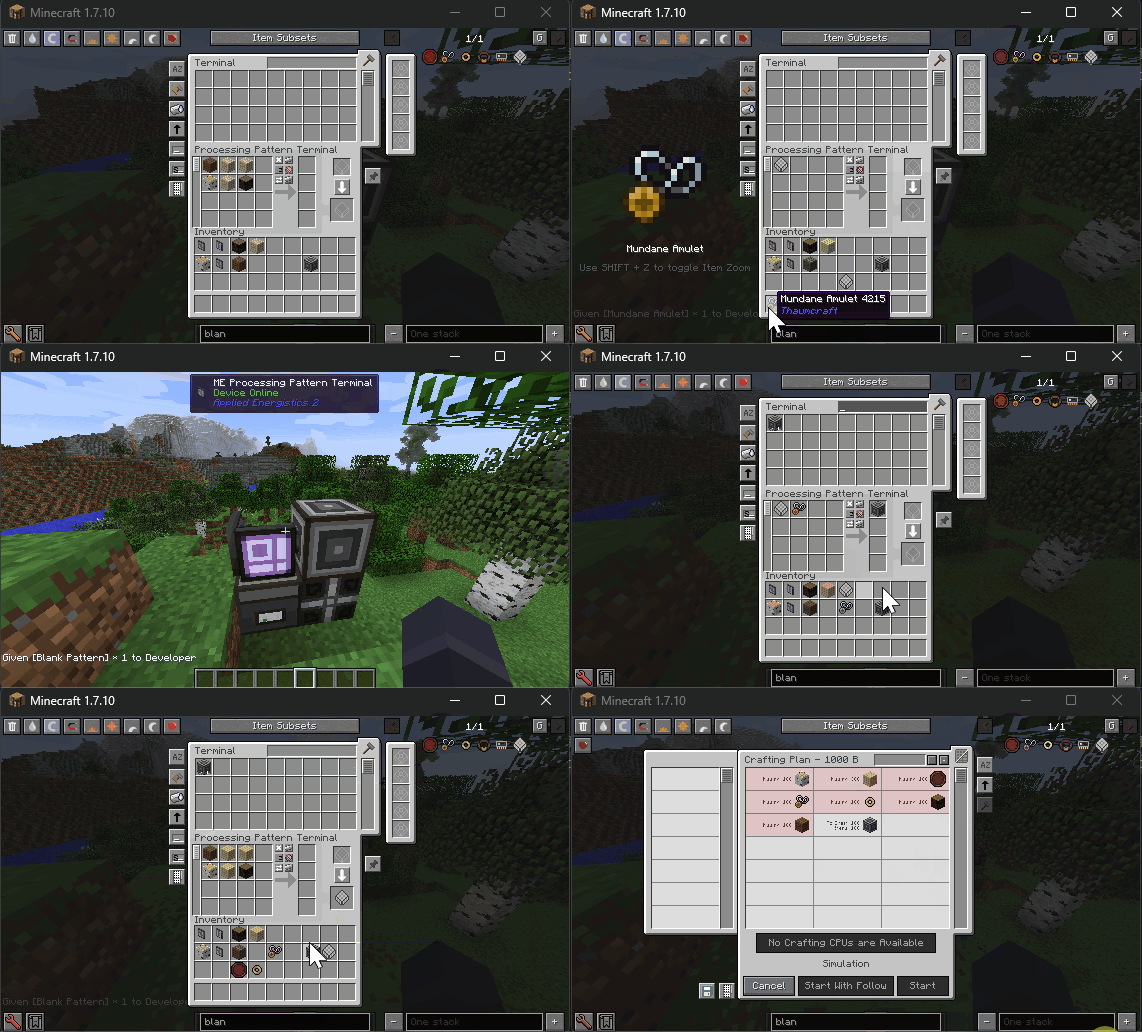
Tunnel Patterns are a new input-only pattern type: a processing pattern with inputs and no outputs, which other patterns use as a single ingredient.
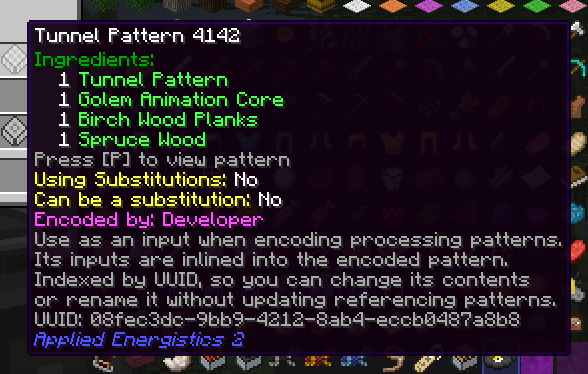
Encoding a processing pattern with nothing in its outputs gives a Tunnel Pattern with its own UUID. Keep it in an interface on the network and use it as an input when encoding other patterns: when a craft is planned, the network swaps in its ingredients, and a Tunnel Pattern can hold other Tunnel Patterns. Re-encode it with the old Tunnel Pattern in the output slot and it keeps its UUID, so every pattern that uses it picks up the new ingredients.
Shipped in: Applied-Energistics-2-Unofficial #1057
Coloured ME Interfaces
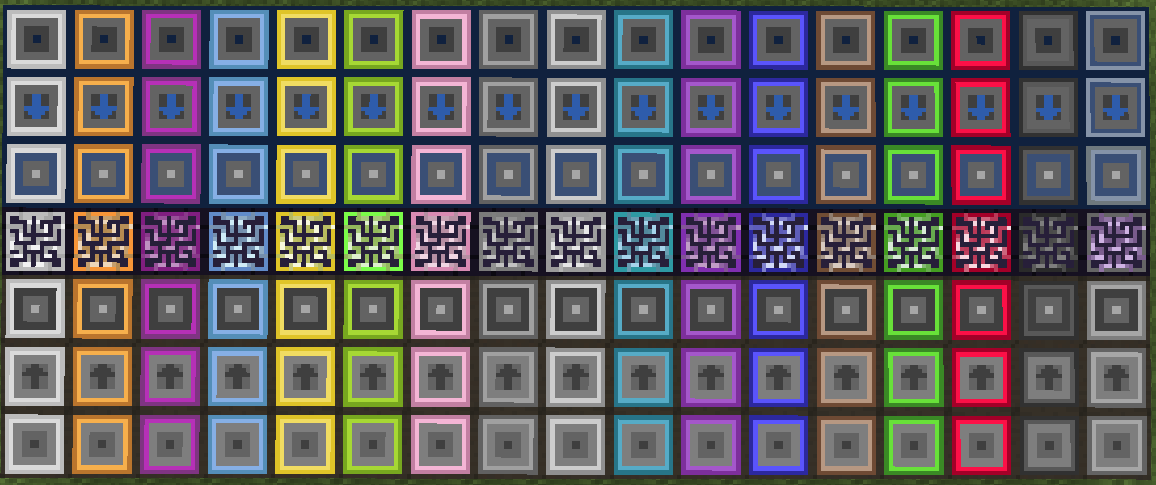
ME Interfaces and ME Dual Interfaces take any of the 16 AE2 colours, and the block is drawn in that colour, arrow and side faces included. A coloured interface does not connect to a cable of a different colour; plain Fluix cable still connects.
Shipped in: AE2FluidCraft-Rework #466, Applied-Energistics-2-Unofficial #1579
Faster item import and export buses
Item import and export buses take Hyper-Acceleration and Superluminal Acceleration Cards now: with four Superluminal Acceleration Cards one operation moves about 67 million items, where it used to stop at 96. AE2 reaches GregTech machines and super and quantum chests through GTNHLib's new item I/O interface, so an export bus filling a super chest is not held to 64 items per slot. ME Interfaces offer the same interface, so a GregTech machine or pipe pushing into one puts the items straight into the network.
Shipped in: Applied-Energistics-2-Unofficial #875, Applied-Energistics-2-Unofficial #955
Fluid Planes and the Certus Quartz Tank
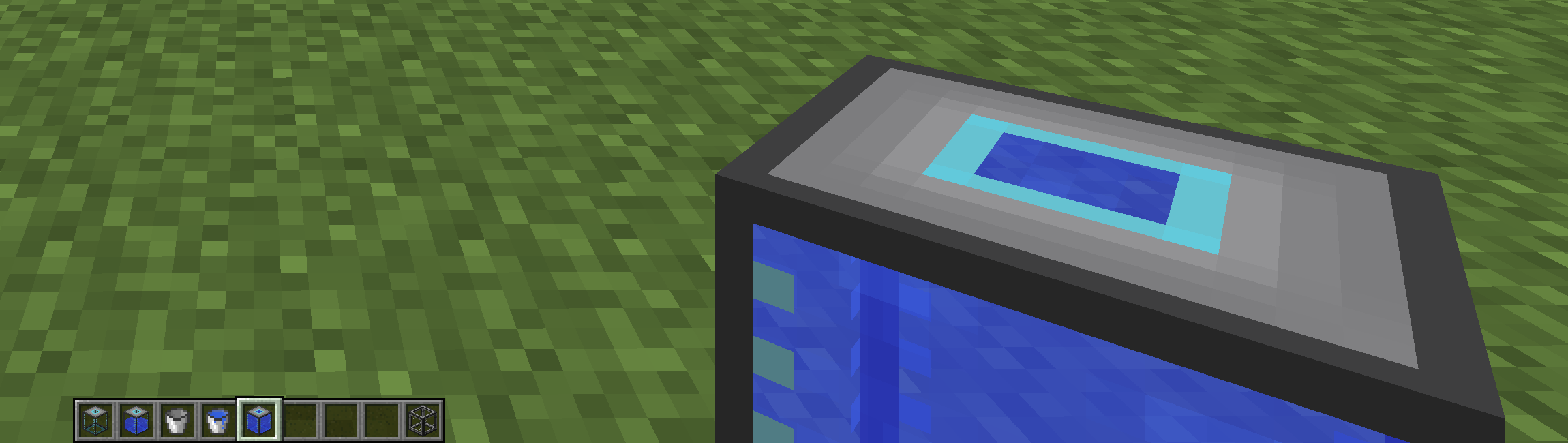
Fluid Formation and Annihilation Planes place and remove fluid the way the item planes place and remove blocks. The annihilation plane takes the source block in front of it into the network: water, lava or any modded fluid. The formation plane places one bucket at a time of a fluid set in its filter.
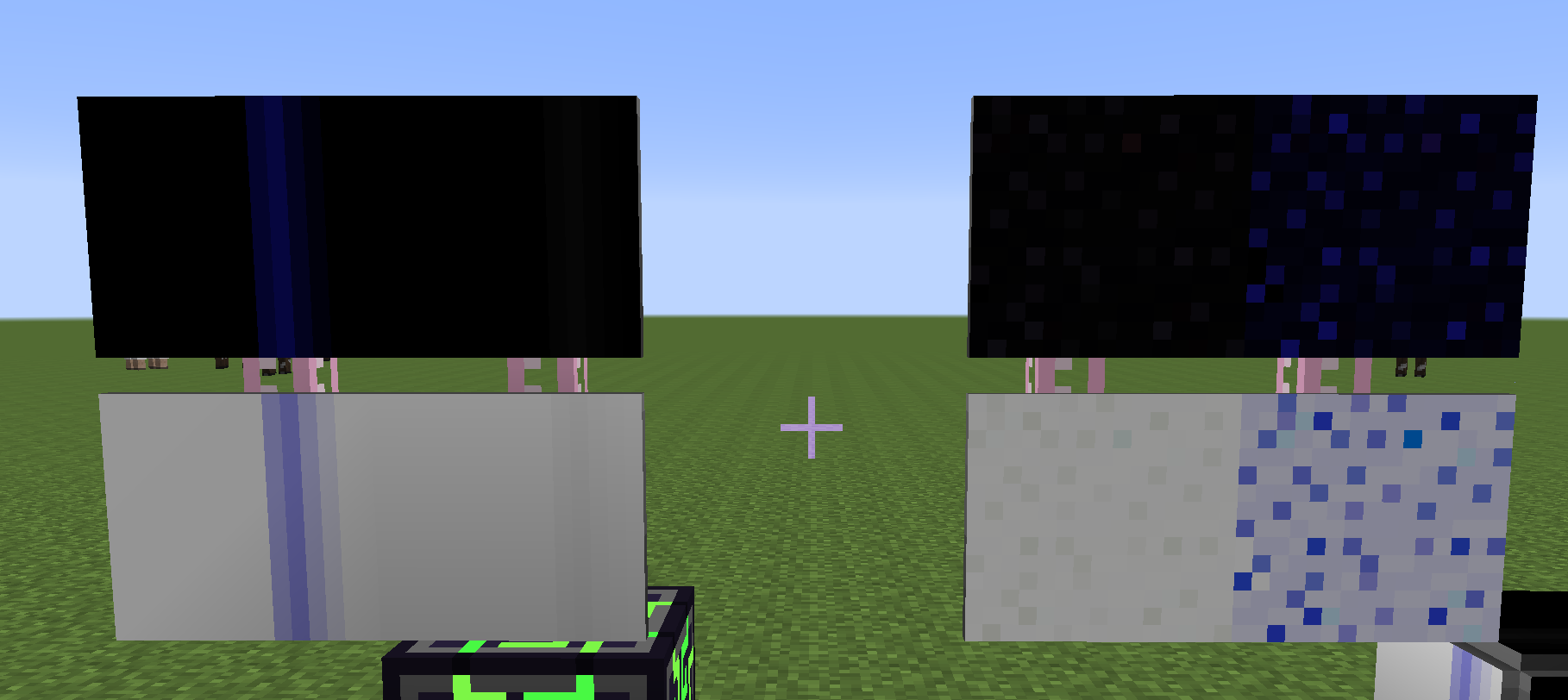
A Certus Quartz Tank tower can be drained from an empty tank at the top. Waila on any tank of the tower, empty ones included, shows the tower's fluid and its full capacity.
Shipped in: AE2FluidCraft-Rework #424, AE2FluidCraft-Rework #447, AE2FluidCraft-Rework #359, AE2FluidCraft-Rework #469
Spatial Link Chamber
A Spatial Link Chamber holding a Spatial Storage Cell connects your ME network into that cell's dimension.
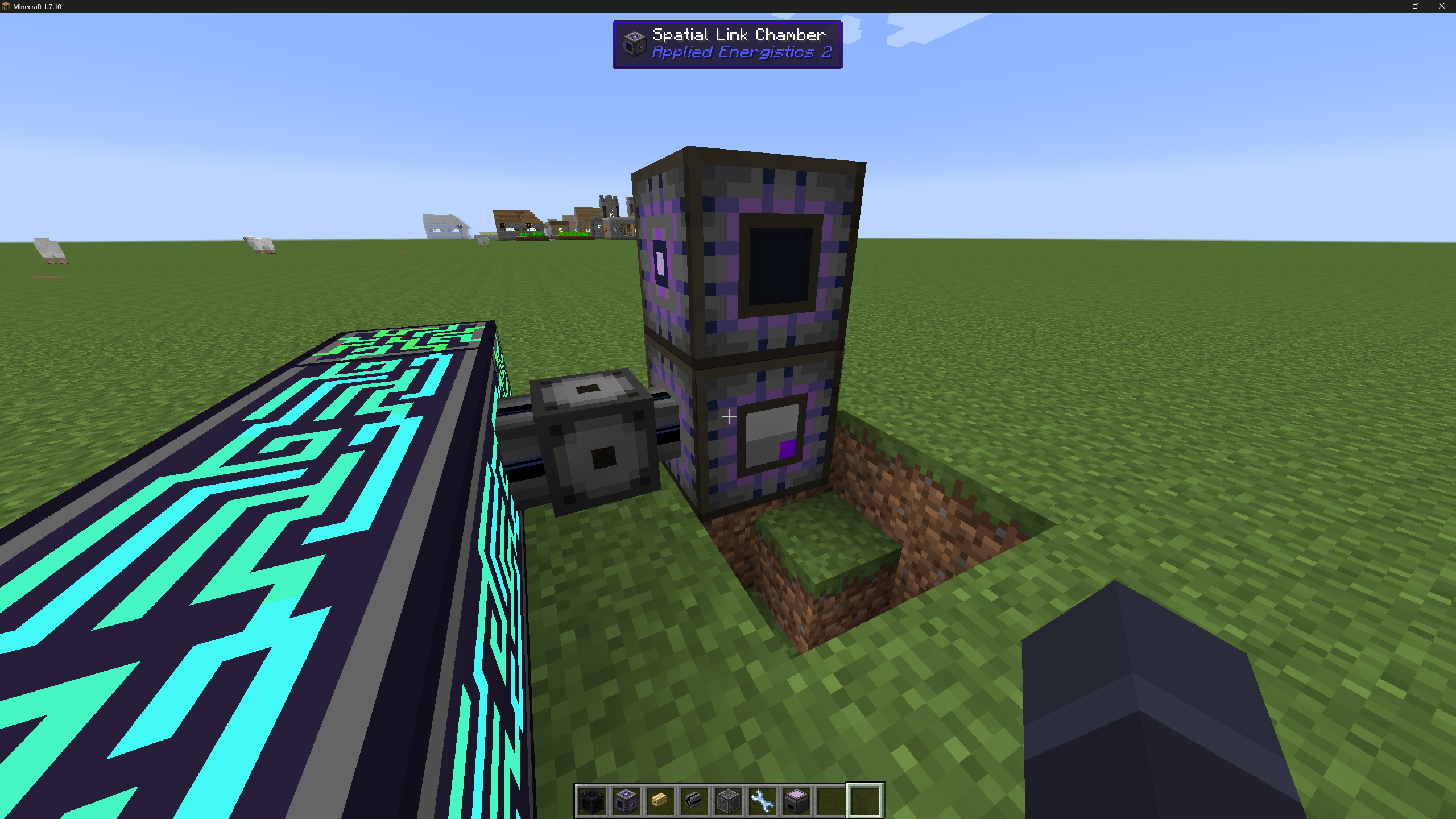
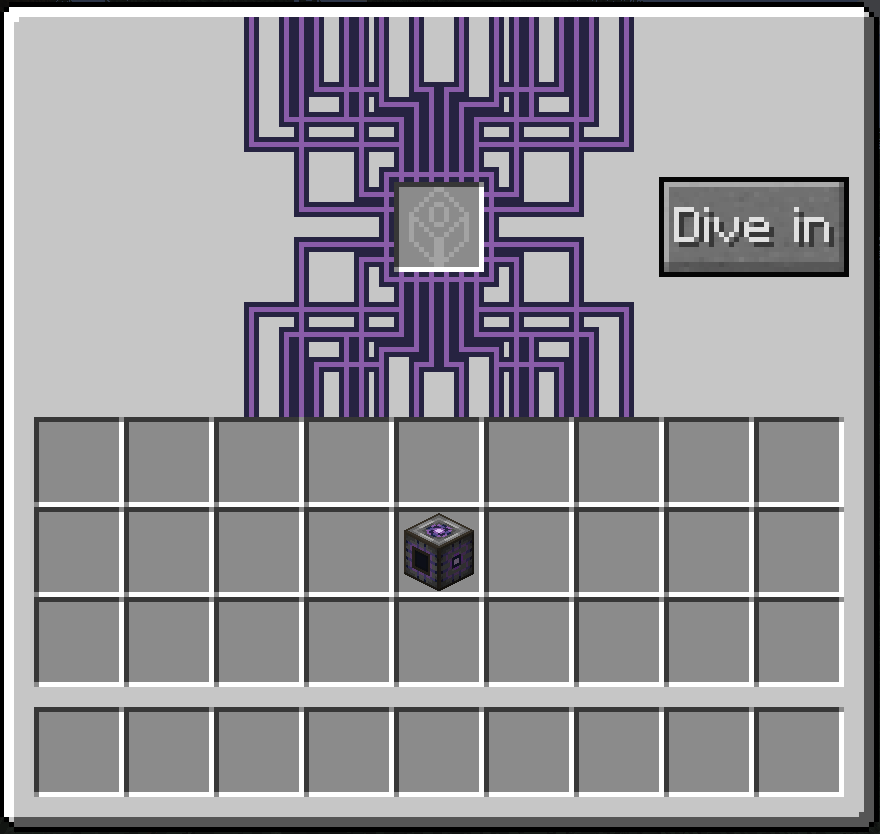
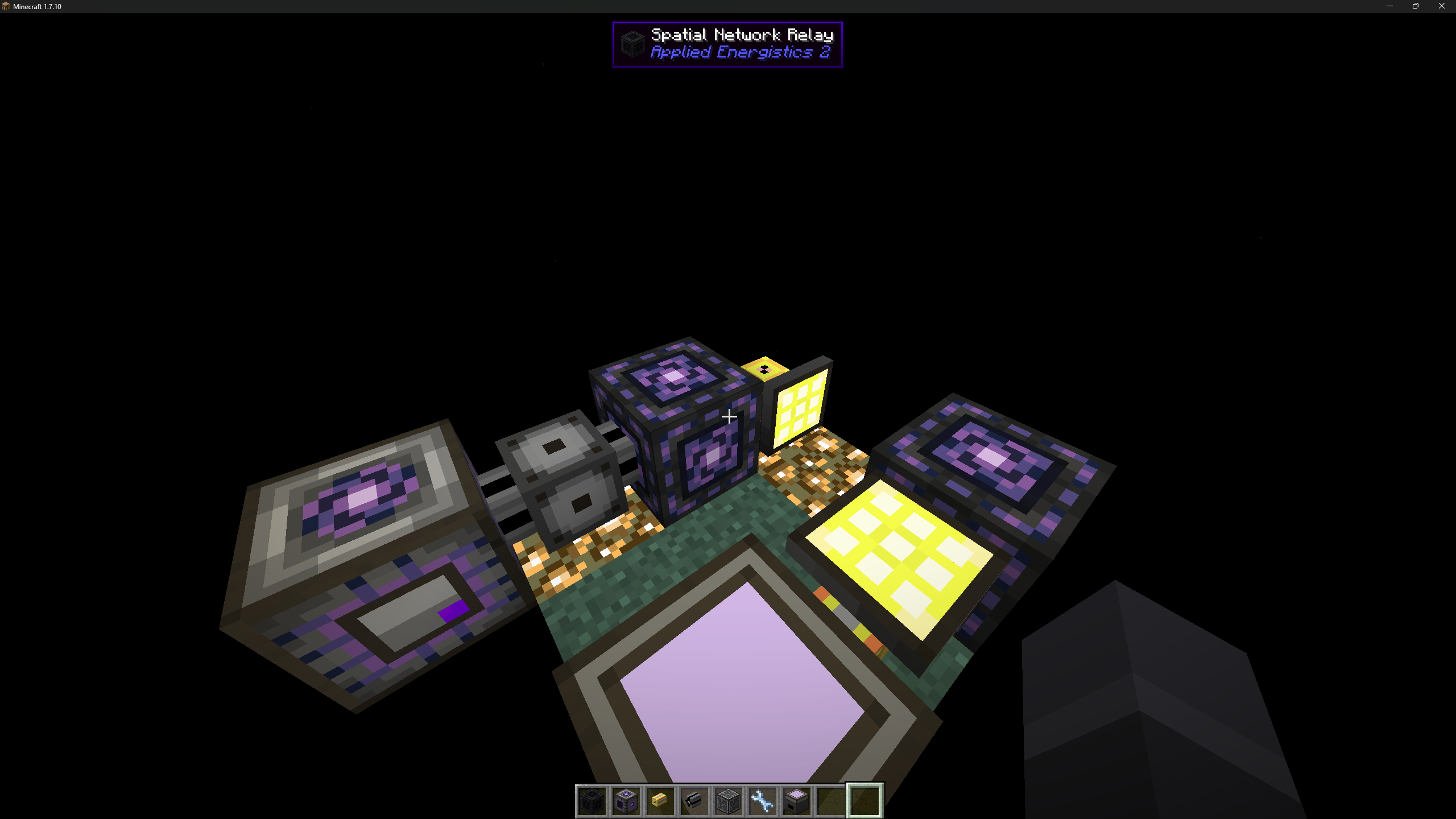
The chamber's Dive in button takes you into the dimension, and sneak-right-clicking its Matrix Frame walls brings you back to the chamber. Inside, a Spatial Network Relay joins the outside network and carries up to 31 channels, since the chamber uses one of its 32.
Shipped in: Applied-Energistics-2-Unofficial #1035, NewHorizonsCoreMod #1651
Interface Terminal quality of life
The Interface Terminal shows each section's interface icon in its header, with that interface's priority in the tooltip. Holding Alt turns an entry's button into a hide button, and a sidebar toggle shows hidden interfaces again. A pattern that uses a kind of stack the interface cannot hold, such as a fluid in an item interface, is highlighted in red.
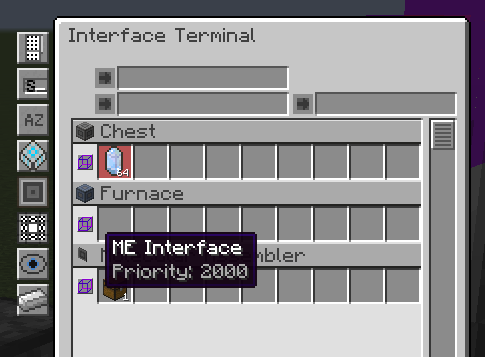
GregTech machines put their ghost circuit number and any non-consumed inputs, such as an Extruder Shape, right in the interface name. Single-block machines, input buses and hatches all do this. The Crafting Input Bus and Buffer (ME) put their name, circuits and each item on separate WAILA lines.
Shipped in 30 pull requests
- Interface Terminal: add block icon to section headers and priority tooltip (Applied-Energistics-2-Unofficial #1219)
- Interface Terminal: hide individual interfaces from the terminal view (Applied-Energistics-2-Unofficial #1228)
- Show non-consumed recipe inputs in AE2 terminal name for basic machines (GT5-Unofficial #7062)
- Implement IInterfaceNameProvider to expose ghost circuit config in AE2 terminal (GT5-Unofficial #6368)
- Improve GT machine and Crafting Input Bus display names in AE2 terminal (GT5-Unofficial #6437)
- Show physical circuits and non-consumed items in AE2 interface name for input buses (GT5-Unofficial #7546)
- Show physical circuits and non-consumed items in AE2 interface name for single blocks and hatches (GT5-Unofficial #7853)
- Fix fluid pattern highlight in Interface Terminal for Crafting Input Buffer (GT5-Unofficial #6489)
- fix interface terminal not allowing you to type without refocusing searchbox (Applied-Energistics-2-Unofficial #1001)
- Interface Terminal crash fixes and improvements (Applied-Energistics-2-Unofficial #1004)
- Rename interface from interface terminal (Applied-Energistics-2-Unofficial #1041)
- Add line wrapping support for all interface names in the Interface Terminal (Applied-Energistics-2-Unofficial #1120)
- Wrap Crafting Input Bus (ME) name across lines in WAILA (GT5-Unofficial #7769)
- Adjust Interface Terminal Gui size (Applied-Energistics-2-Unofficial #1218)
- Restore Shift+click rename in Interface Terminal (Applied-Energistics-2-Unofficial #1237)
- Fixes Interface Terminal hover highlight box (Applied-Energistics-2-Unofficial #1247)
- Pattern Repeater add to interface terminal support (Applied-Energistics-2-Unofficial #1278)
- Pattern multiplication in interface terminal (Applied-Energistics-2-Unofficial #1396)
- Add option to disable Interface Terminal search autofocus (Applied-Energistics-2-Unofficial #1464)
- fix: render interface terminal tooltips above patterns (Applied-Energistics-2-Unofficial #1513)
- Fix Interface Terminal creative pick-block (Applied-Energistics-2-Unofficial #1514)
- add show on Interface Terminal button (GT5-Unofficial #5402)
- Fix crib highlight on Interface Terminal (GT5-Unofficial #5619)
- Add Large Molecular Assembler to interface terminal (GT5-Unofficial #5688)
- Fix Crash with LMA in Interface Terminal, Add Temporary Texture for Pattern Provider (GT5-Unofficial #5979)
- feat(appeng): add integration for interface terminal (OpenComputers #173)
- Hide CRIB suffixes when using custom names (GT5-Unofficial #7577)
- Fix invalid pattern highlighting after slot updates (Applied-Energistics-2-Unofficial #1587)
- Change the position of the inventory label inside the Interface terminal (Applied-Energistics-2-Unofficial #1622)
- Read the terminal entry name from the machine when no key exists (Applied-Energistics-2-Unofficial #1633)
Watch on Discord - 2 video clip(s)
Interfaces: stuck, named, and copied with a memory card
An ME Interface block that cannot push out what it is holding is drawn with a red tint until it empties.
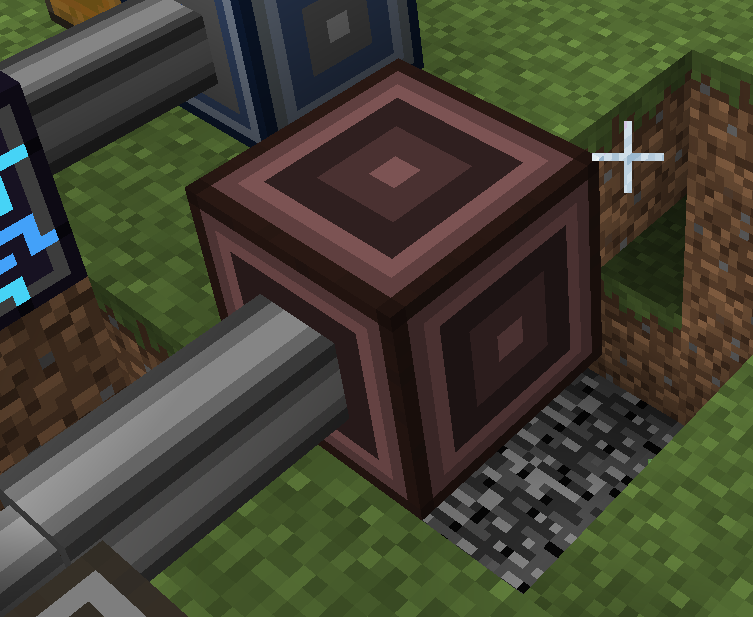
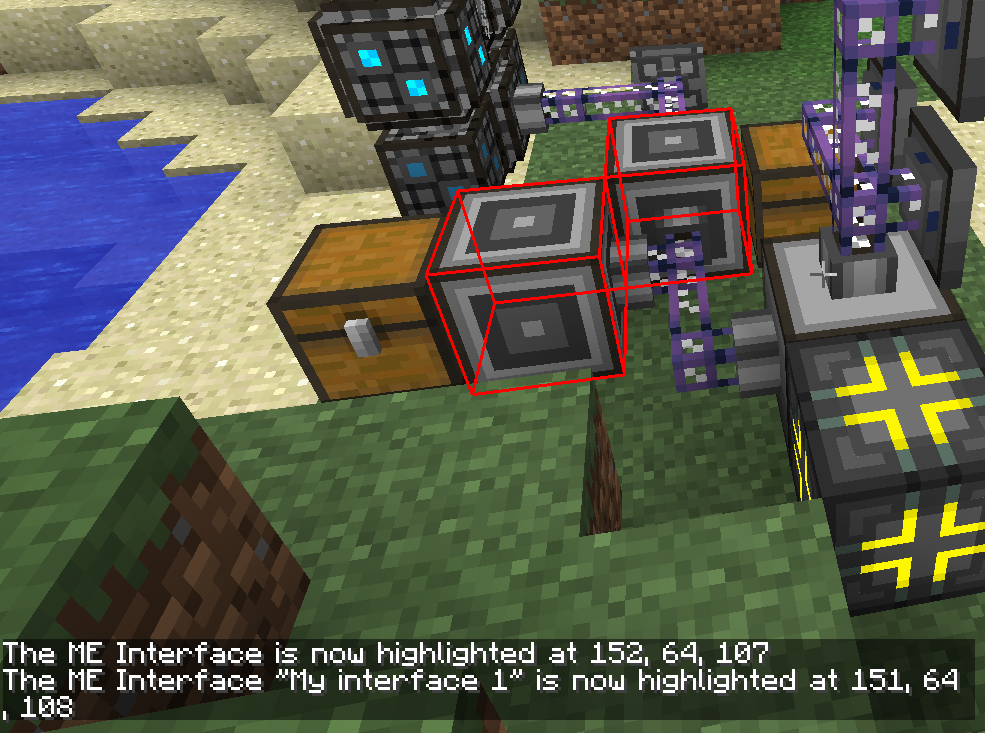
When the Network Tool, the Interface Terminal or a crafting job highlights a named interface, the chat line gives its name next to the coordinates. Mods get an API to add a suffix to an interface's name, so a machine can say which one it is.
The Memory Card copies more than it did: a part's custom name and ore filter, a P2P interface's priority and configuration, and an interface's patterns, each pasted pattern using one Blank Pattern from your inventory. On paste, the card swaps the target's upgrade cards for the copied set and returns the old ones to your Network Tool or inventory.
Shipped in 16 pull requests
- red tint when something stuck in interface (Applied-Energistics-2-Unofficial #1078)
- restore stuck tint remove stuck highlight (Applied-Energistics-2-Unofficial #1419)
- Add Blood Arsenal's Transparent Orb to blocking mode blacklist (Applied-Energistics-2-Unofficial #1426)
- Interface try push out cache stacks on neighbors update (Applied-Energistics-2-Unofficial #1254)
- Add functionality to display the name of the Me interface when it is highlighted. (Applied-Energistics-2-Unofficial #846)
- feat(interface): add IInterfaceNameProvider API for dynamic terminal name suffixes (Applied-Energistics-2-Unofficial #1196)
- Resolve interface name suffixes as chat components (Applied-Energistics-2-Unofficial #1545)
- Fix empty custom name being kept on cable parts (Applied-Energistics-2-Unofficial #1554)
- Improve copying via memory card (Applied-Energistics-2-Unofficial #1359)
- Allow to copy Fluid Interface fluid config to Memory Card (AE2FluidCraft-Rework #443)
- pack interface stuck state with other client flags + only tick on client (Applied-Energistics-2-Unofficial #1093)
- Fix duplicate Waila names after applying memory card settings (Applied-Energistics-2-Unofficial #1586)
- Memory Card now copies patterns (Applied-Energistics-2-Unofficial #1604)
- Preserve custom names in Network Status entries (Applied-Energistics-2-Unofficial #1647)
- Skip EnderIO conduits and GT pipes when naming interfaces (Applied-Energistics-2-Unofficial #1668)
- Linked Input Bus: name interfaces after the multiblock (GT5-Unofficial #8110)
Patterns: blank ones off the network, and a look inside
Blank patterns are taken straight off the network when encoding, so there is no reason to carry a stack of them. With the blank pattern slot empty, left click takes a stack from storage and right click half a stack, and middle click opens the craft order when blank patterns can be autocrafted.
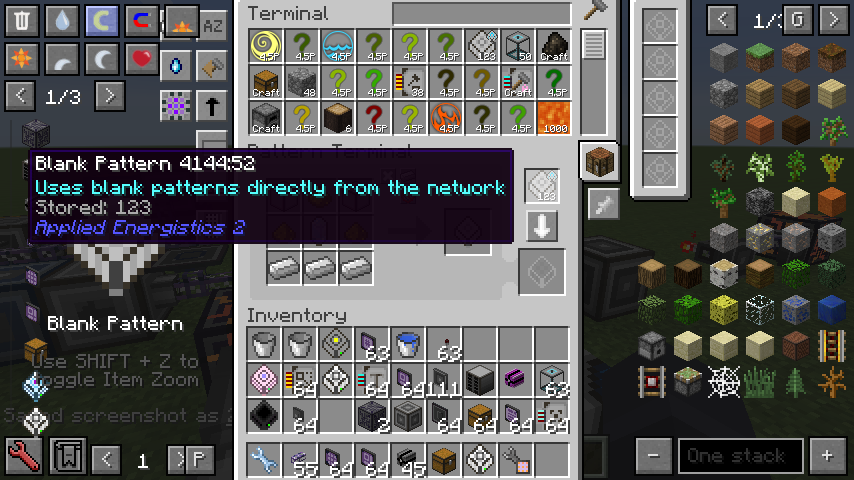
Pressing P over an encoded pattern opens a page with its inputs and outputs, and the NEI recipe and usage keys look up its main output. The red highlight on a pattern that uses a kind of stack the interface cannot hold can be turned off in the config.
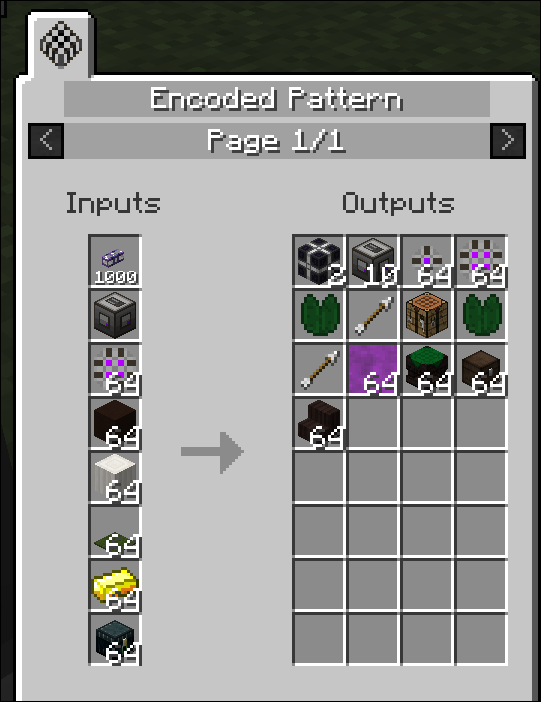
The Pattern Refiller Card is gone, and with it the crash when a Memory Card was used on a terminal.
The pattern items are named after the Pattern Terminal's two modes now: Encoded Pattern is Crafting Pattern, Encoded Ultimate Pattern is Processing Pattern, and AE2 Fluid Craft's pattern is Fluid Processing Pattern. A newly encoded pattern also shows in its tooltip when it was encoded, so patterns encoded at different times no longer stack.
Shipped in 9 pull requests
- Use blank patterns directly from the network (Applied-Energistics-2-Unofficial #1200)
- Add Encoded Pattern preview (Applied-Energistics-2-Unofficial #908)
- Allow viewing crafting and usage of the pattern main output (Applied-Energistics-2-Unofficial #974)
- Add config option to disable highlighting type mismatch patterns (Applied-Energistics-2-Unofficial #1414)
- remove pattern refill card (Applied-Energistics-2-Unofficial #984)
- Show phantom slot tooltips outside terminals (Applied-Energistics-2-Unofficial #1390)
- Rename pattern items to match the Pattern Terminal (Applied-Energistics-2-Unofficial #1678)
- Rename (fluid) Encoded Pattern to Fluid Processing Pattern (AE2FluidCraft-Rework #473)
- Add encoding timestamps to patterns (Applied-Energistics-2-Unofficial #1681)
Cells, chests and drives
An ME Storage Reshuffle block takes everything stored on its network out and puts it back, so each stack lands where the current priorities, partitions and sticky cells send it. That is what you want after changing a priority or partitioning a cell. Once started it runs on its own, and while it runs the network's storage refuses every other insert and extract. ME Drives, ME Chests and storage buses have a Reshuffle Access setting that limits the reshuffle to extracting, inserting or neither on that storage.
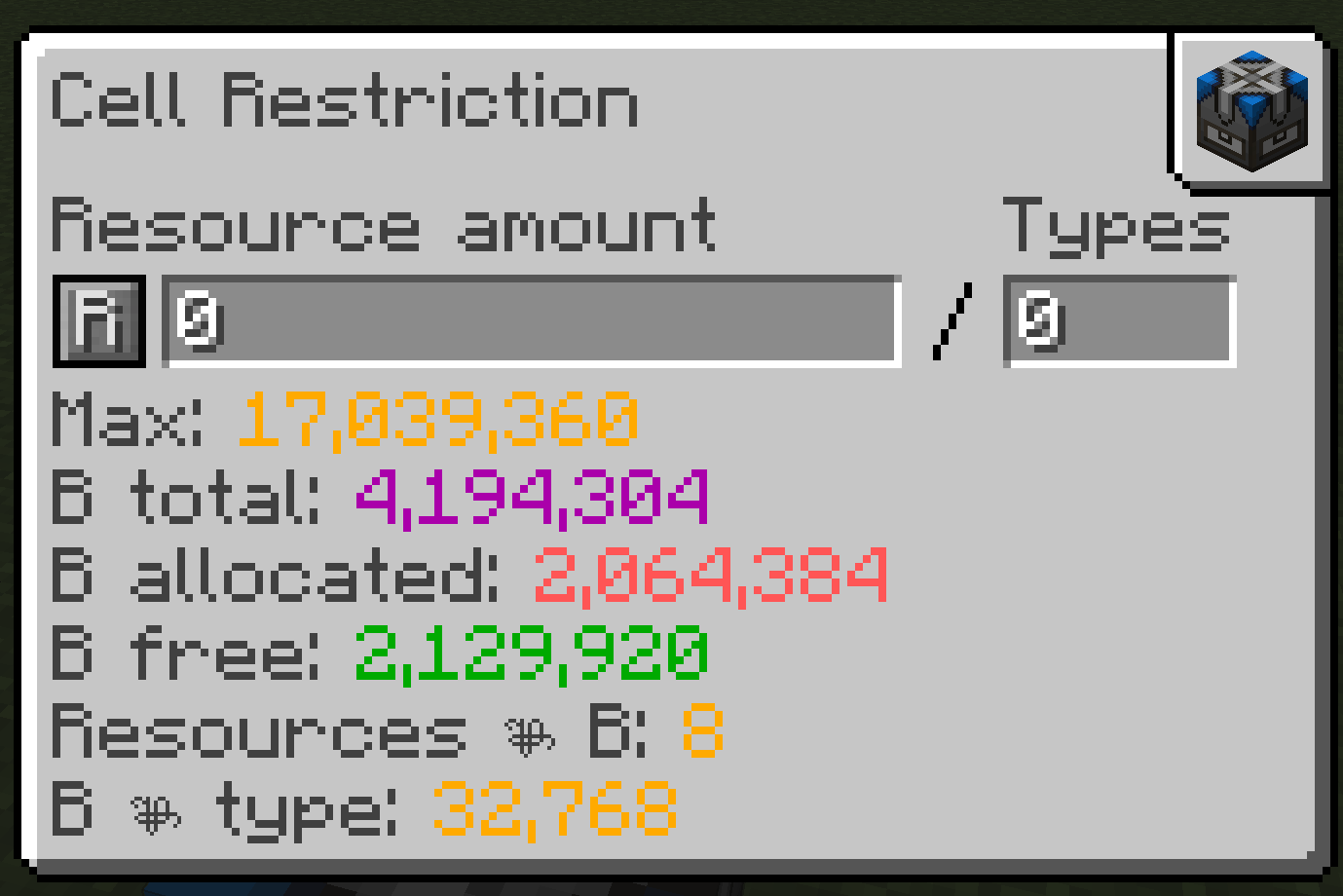
The Cell Restriction screen shows the bytes a limit takes - total, allocated and free - and the most the cell can hold at the chosen type count. An R button clears the limit.
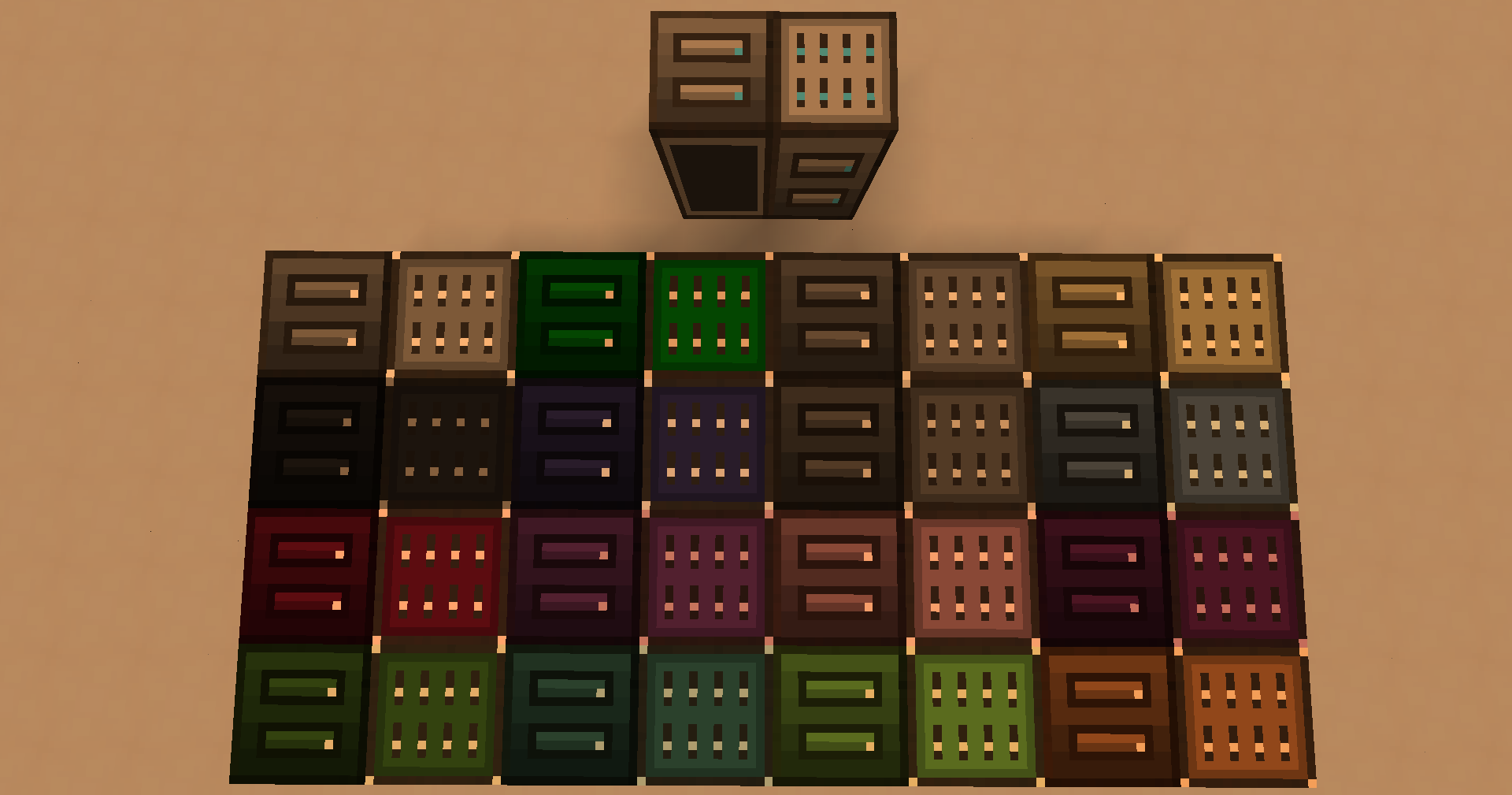
ME Chests show a fluid cell with a different face from an item cell, and ME IO Ports take a colour like ME Chests and ME Drives.
Shipped in 19 pull requests
- Cell Restriction rework (Applied-Energistics-2-Unofficial #1265)
- Add Additional Fuzzy Card Breakpoints for 10% and 1% (Applied-Energistics-2-Unofficial #923)
- Reshuffle for AE2 (Applied-Energistics-2-Unofficial #1072)
- Use priority to determine extract order of items in IO Port (Applied-Energistics-2-Unofficial #889)
- Changed the entry state of the Matter Condenser to be in Singularity Mode (Applied-Energistics-2-Unofficial #1136)
- implement storage interceptor & fix locking card (Applied-Energistics-2-Unofficial #993)
- Show storage cell upgrades in the tooltip (Applied-Energistics-2-Unofficial #1462)
- Add tooltips for creative energy blocks and drive warning (Applied-Energistics-2-Unofficial #1046)
- Added Color to the ME Drives to reflect ME Chests. (Applied-Energistics-2-Unofficial #862)
- Make ME IO Ports Colorable (Applied-Energistics-2-Unofficial #1403)
- Added Cell View color enum (Applied-Energistics-2-Unofficial #1167)
- Cell Restriction rework (AE2FluidCraft-Rework #428)
- Update ME Chest display for fluid cells (AE2FluidCraft-Rework #456)
- fix cell view text formatting (AE2FluidCraft-Rework #449)
- Fix item loss during storage reshuffling (Applied-Energistics-2-Unofficial #1612)
- Add reshuffler access configuration (Applied-Energistics-2-Unofficial #1613)
- Fix Reshuffle progress bar end marker (Applied-Energistics-2-Unofficial #1615)
- Allow configuring reshuffler access on ME storage buses (Applied-Energistics-2-Unofficial #1659)
- Fix conflicting reshuffle access defaults (Applied-Energistics-2-Unofficial #1669)
Searching, pinning and NEI in the terminal
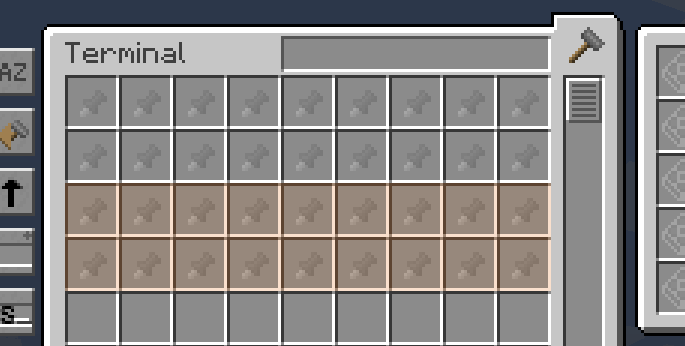
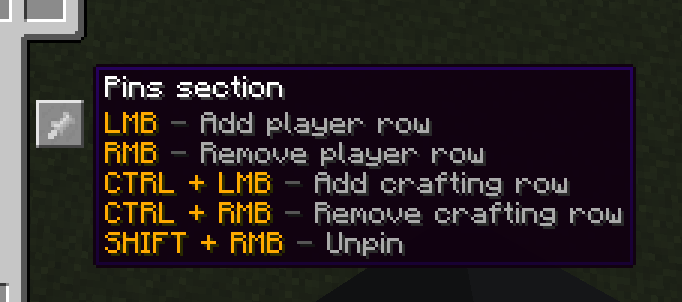
A saved search belongs to the terminal it was typed into, so a filter left in one is not waiting in every other one. A pin can be set by dropping an NEI item on it, without holding the item. A memory card copies a terminal's pins and type filters along with its other settings.
NEI's search finds essentia cells by what they hold, as it already did item and fluid cells, and AE2's own materials are ordered there by hand instead of alphabetically.
Shipped in 15 pull requests
- Improve search (Applied-Energistics-2-Unofficial #1097)
- make saved search local saved (Applied-Energistics-2-Unofficial #1378)
- Pins cleanup (Applied-Energistics-2-Unofficial #1181)
- Added info tooltip for Pins Button (Applied-Energistics-2-Unofficial #1050)
- Support NEI ghost items for terminal pins (Applied-Energistics-2-Unofficial #1220)
- Make AE2 dropoff use Bogo pins (Applied-Energistics-2-Unofficial #1483)
- Add NEICellSearchFilter (Applied-Energistics-2-Unofficial #1179)
- fix materials order in NEI (Applied-Energistics-2-Unofficial #985)
- Improve terminal interaction with type filter (Applied-Energistics-2-Unofficial #1147)
- Quick container transfer (Applied-Energistics-2-Unofficial #1189)
- Allows to disable pausing when shift-click in AE Terminal (Applied-Energistics-2-Unofficial #899)
- Crafting row as crafting history (Applied-Energistics-2-Unofficial #1470)
- fix shift not locking items into place (Applied-Energistics-2-Unofficial #1663)
- Copy terminal type filters with memory cards (Applied-Energistics-2-Unofficial #1670)
- Copy terminal pins with memory cards (Applied-Energistics-2-Unofficial #1680)
Wireless Connectors move into AE2, and sixteen networks per terminal
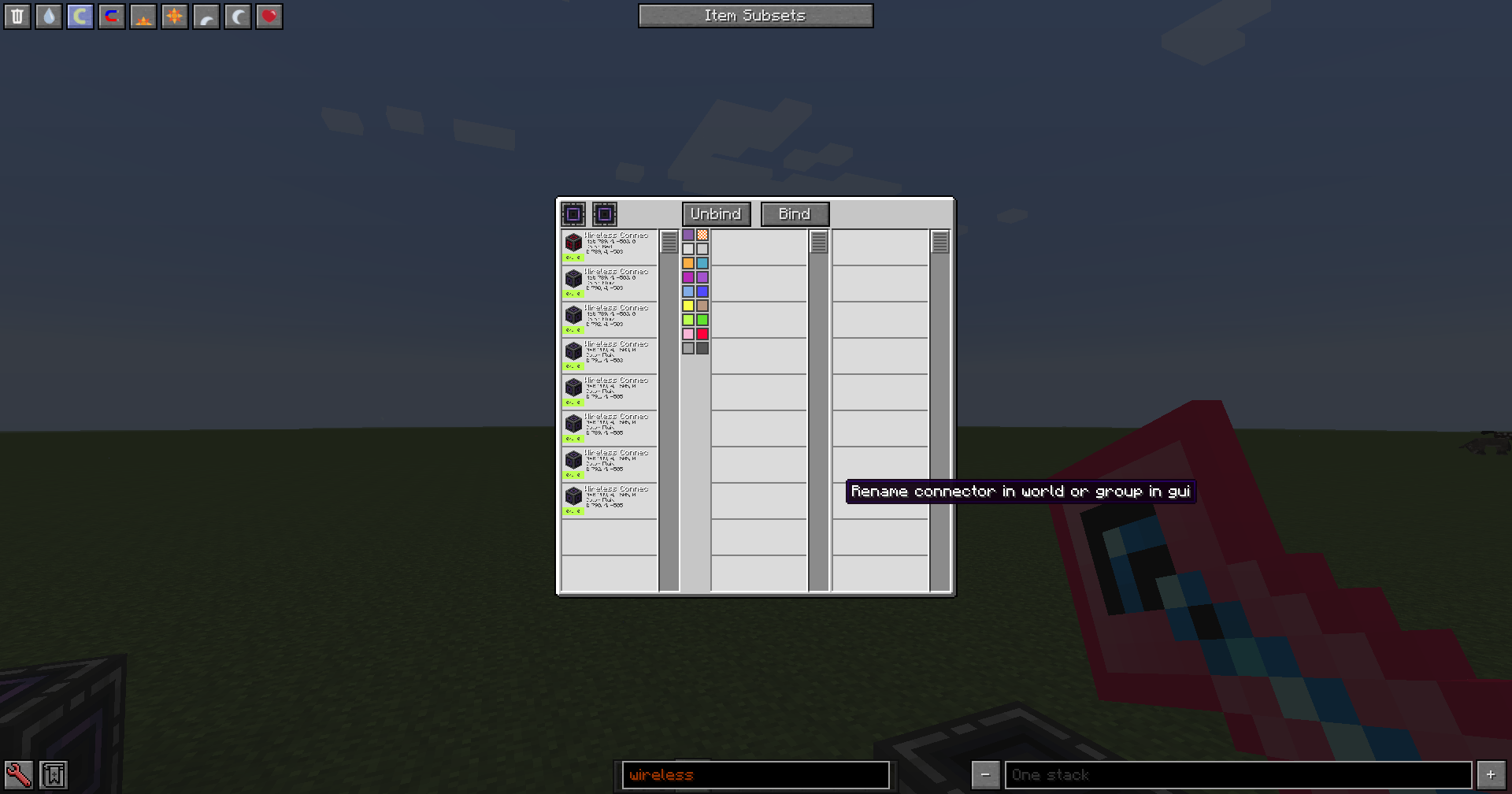
Wireless Connectors, Wireless Hubs and the Wireless Kit are now part of AE2. AE2 Stuff is gone, and its connectors, hubs and both setup kits turn into the AE2 ones. The kit has four modes, Simple, Advanced, Advanced Line and Super, cycled with Tab and right-click. Super mode keeps a list of networks and opens a screen over all their connectors and hubs, where they can be bound, unbound, renamed and recoloured in groups.
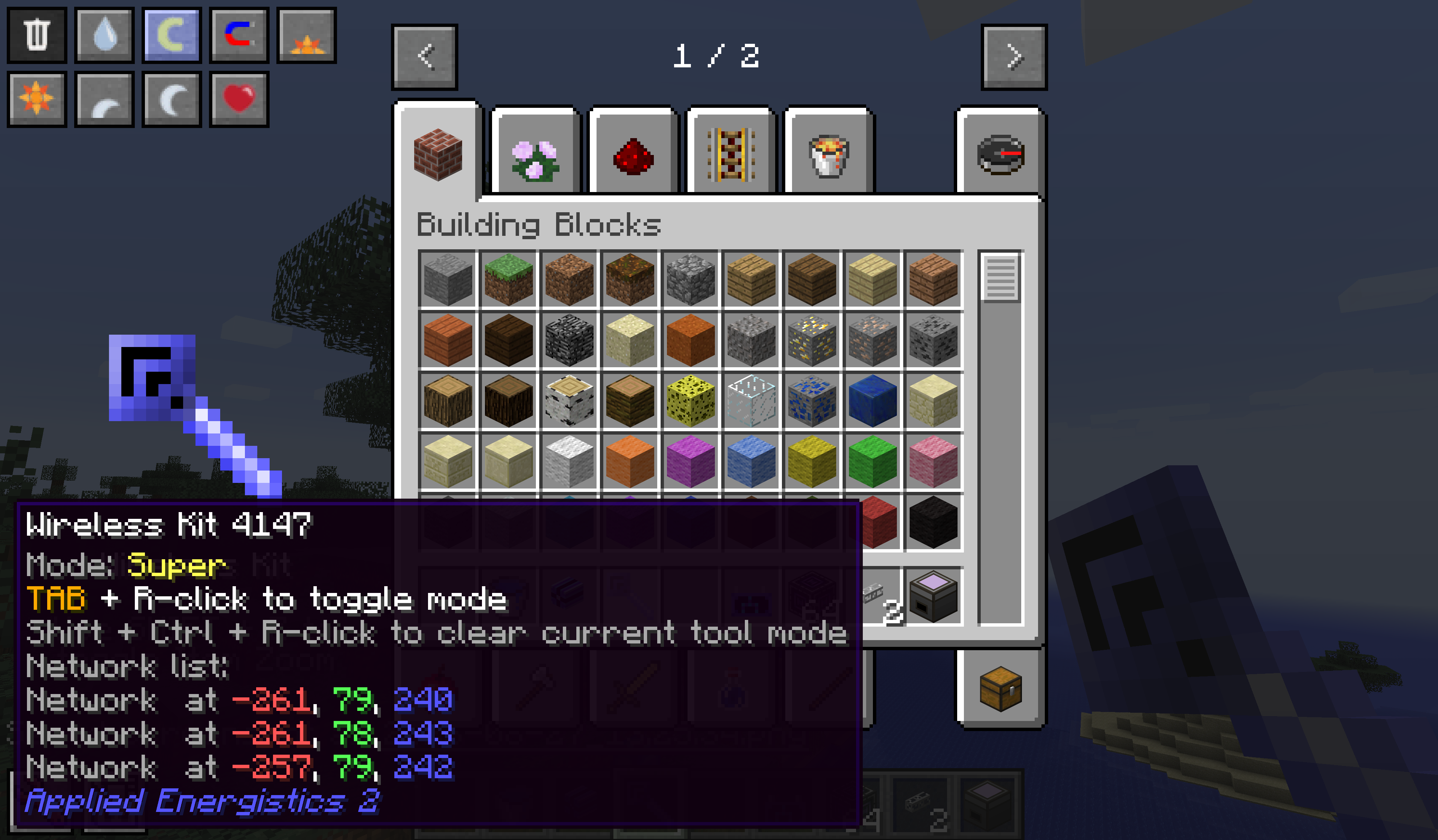
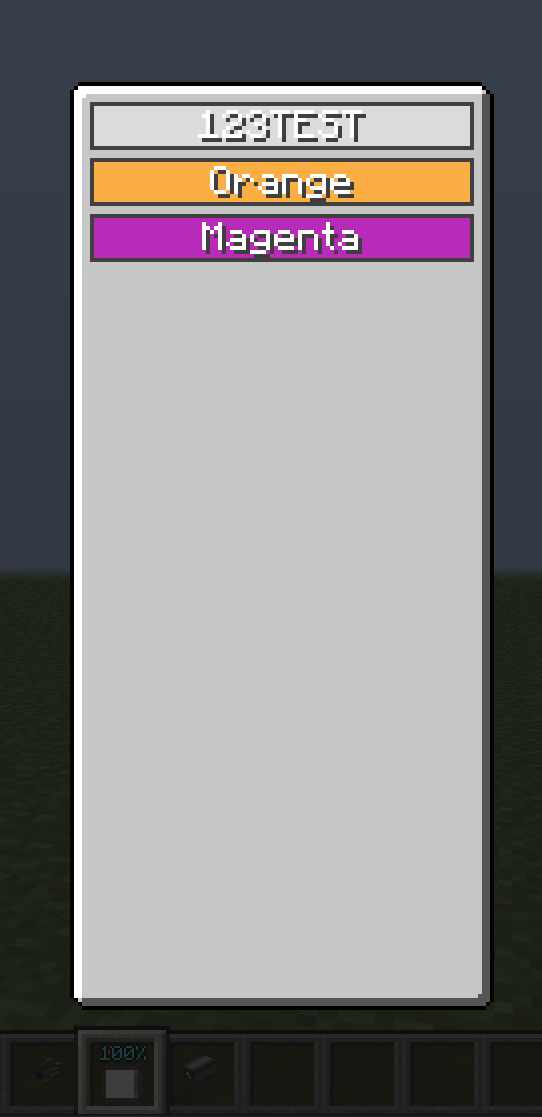
A wireless terminal can hold links to up to sixteen networks. Tab and right-click opens the list, and clicking one switches the terminal to it.
Right-clicking a Wireless Access Point with a terminal links it to that network. Each mode of the Wireless Universal Terminal can have its own key to open it.
Shipped in: Applied-Energistics-2-Unofficial #734, Applied-Energistics-2-Unofficial #1268, Applied-Energistics-2-Unofficial #1054, Applied-Energistics-2-Unofficial #1398, Applied-Energistics-2-Unofficial #1309, Applied-Energistics-2-Unofficial #1287, Applied-Energistics-2-Unofficial #957, AE2FluidCraft-Rework #379
The Level Maintainer
A Level Maintainer takes a fluid in its request slot and reads the stock straight from the network's fluid storage, so it no longer needs a Fluid Discretizer to see a fluid. A Memory Card copies a maintainer's whole request list onto the next one, and Tab and Shift-Tab step through the quantity and batch fields.
Shipped in: AE2FluidCraft-Rework #339, AE2FluidCraft-Rework #327, AE2FluidCraft-Rework #446, AE2FluidCraft-Rework #387, AE2FluidCraft-Rework #417, AE2FluidCraft-Rework #405
Stock Replenishers
The Super Stock Replenisher has a Full-stock Mode. Once the replenisher has been emptied, it hides its whole inventory until every item and fluid is fully stocked again, so nothing pulls a partial set out of it. In that mode it also tops up any slot below its set amount. Normal Mode, which restocks a slot once it drops below half, stays the default. The block has a new texture.
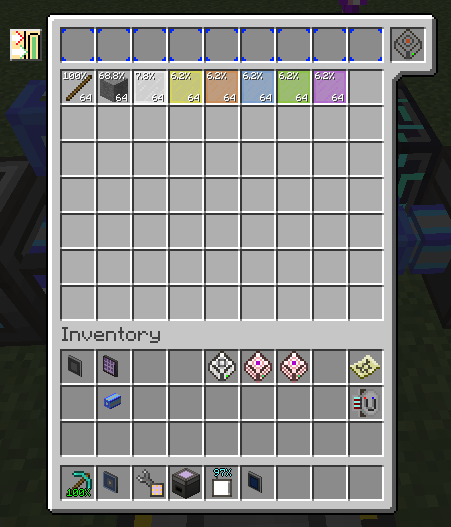
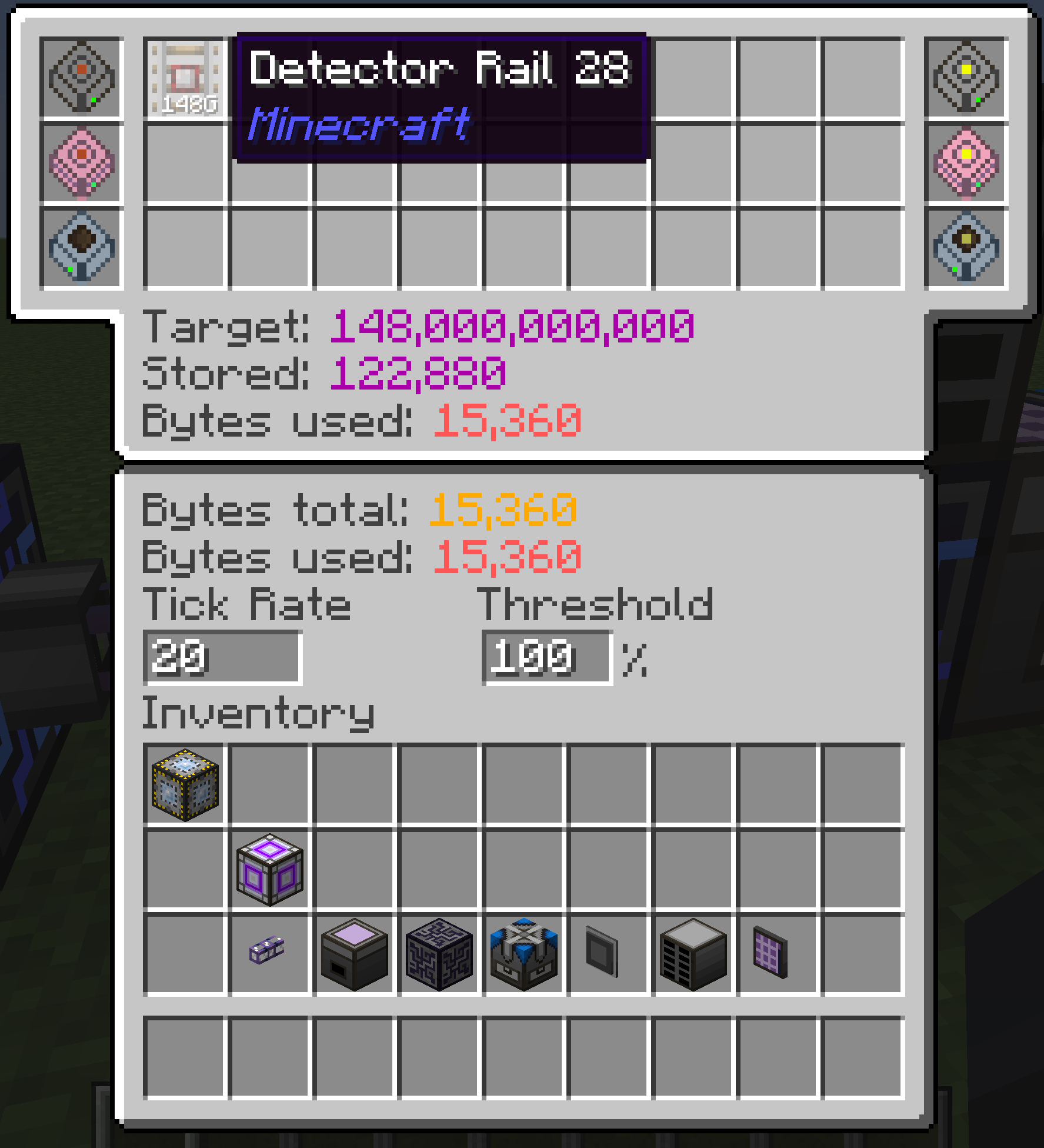
AE2 gained a Super ME Replenisher, which a network reads only through a storage bus. It keeps up to 27 stacks of any type at long counts, with room set by the storage cells in its six cell slots. When a stack falls below the threshold you set, it refills it, checking at the tick rate you set. Anything injected into it is cached and pushed into its own network on the same timer.
Shipped in: AE2FluidCraft-Rework #442, AE2FluidCraft-Rework #435, AE2FluidCraft-Rework #386, Applied-Energistics-2-Unofficial #1294, Applied-Energistics-2-Unofficial #1321, Applied-Energistics-2-Unofficial #1621
New AE2 recipes
From the 4x up, each Crafting Co-Processing Unit is now assembled from one Crafting Unit and two circuits, IV circuits for the 4x up to UEV for the 4096x, and the crafting-table recipes that merged four of one tier into the next are gone. An Unpackager takes any of them apart again.
The ME Wireless Access Point and the ME Fluid Import and Export Buses have Assembler recipes now, next to their crafting table ones. The new Fluid Formation and Annihilation Planes come with both a crafting table and an Assembler recipe. The new ME Pattern Repeater is made only in the Assembler, at UV. The Large Molecular Assembler's Crafting Pattern Provider has an Assembler recipe for each tier from IV to UHV. An Unpackager splits any Crafting Storage from 1k to 16384k back into its Crafting Unit and storage component, and a Forge Hammer breaks an AE2 Singularity into 100 Matter Balls.
Shipped in 12 pull requests
- Remove GTNH Specific Co-Processor Recipes (Applied-Energistics-2-Unofficial #1314)
- Adds New Recipes For Co-Processors (NewHorizonsCoreMod #1767)
- Commiting an import and export bus assembler recipe (NewHorizonsCoreMod #1675)
- Assembler Recipe for Wireless Access Point Assembler (NewHorizonsCoreMod #1664)
- Add Fluix Pearl Assembler Recipe (NewHorizonsCoreMod #1443)
- add fluid annihilation/formation plane recipes (NewHorizonsCoreMod #1898)
- Add Recipe for Pattern Provider (NewHorizonsCoreMod #1621)
- Adds Recipe for Pattern Repeater (NewHorizonsCoreMod #1674)
- Pushback Pattern Repeater to UV Voltage (NewHorizonsCoreMod #1766)
- Tiered recipes for LMA Pattern Provider (NewHorizonsCoreMod #1795)
- Add Packager unpacking recipes for AE2 Crafting Storage (NewHorizonsCoreMod #1881)
- Add a recipe to break down ae2 singularity into matter balls (NewHorizonsCoreMod #1400)
Two pin sections and your own amount buttons
Terminal pins come in two sections, player pins and crafting pins, each up to 16 rows as long as together they leave a row of the grid free. The crafting section is a history: every crafting job you start goes to its front, and the oldest drops off.
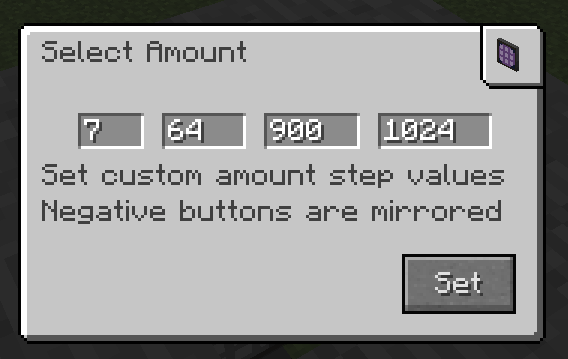
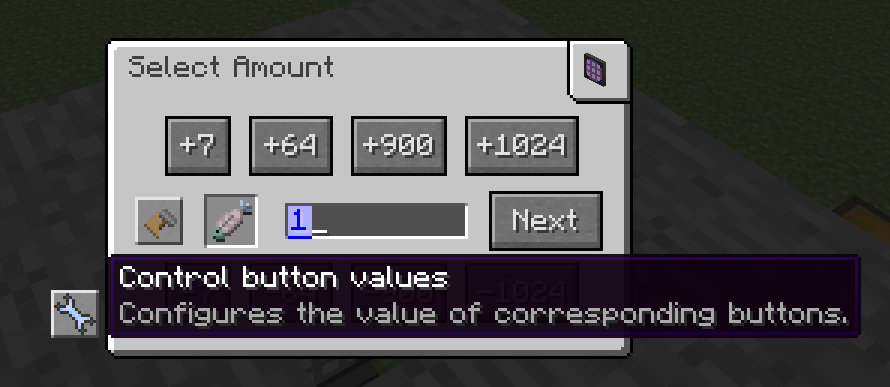
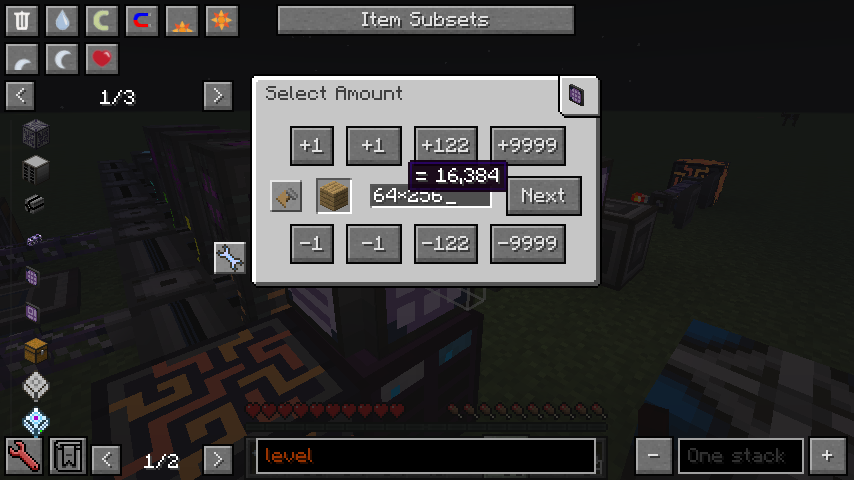
The four step buttons of the crafting Select Amount screen take values you set there, and the minus buttons mirror them.
Shipped in: Applied-Energistics-2-Unofficial #1155, Applied-Energistics-2-Unofficial #1138
NEI Bookmark Group Filter Drops
Shift-dragging an NEI bookmark group onto an ME Storage Bus's filter slots sets the whole group at once. Filling starts at the slot under the cursor and runs through the ones after it. The same drag sets a cell's partition in the Cell Workbench.
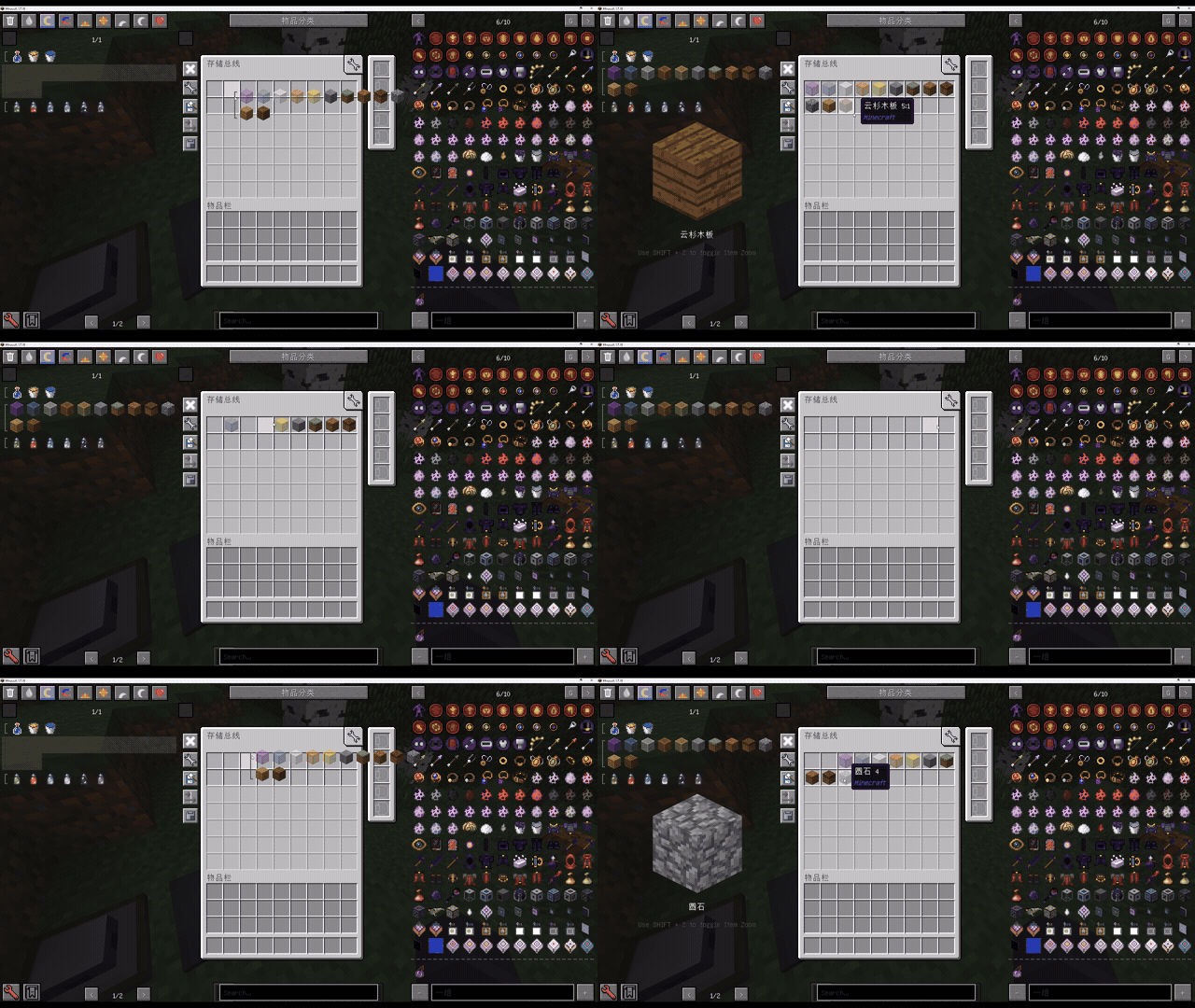
Shipped in: Applied-Energistics-2-Unofficial #1487, Applied-Energistics-2-Unofficial #1552
Watch on Discord - 1 video clip(s)
Sorting the crafting CPU list
The crafting CPU list has two new buttons. One picks what the CPUs are sorted by: name, crafting progress with busy CPUs first, storage memory, co-processors, or which requests a CPU accepts. The other flips between ascending and descending. Hovering a busy CPU also names the player who requested the job, or says it was requested by a machine.
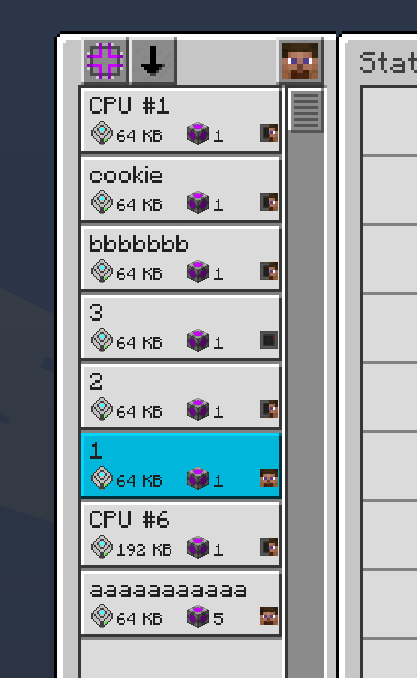
Shipped in: Applied-Energistics-2-Unofficial #1143, Applied-Energistics-2-Unofficial #1145, Applied-Energistics-2-Unofficial #1010
AE2 Color Applicator QoL Upgrade
Shift + Right Click with the AE2 Color Applicator, in the air or on a block it cannot paint, opens a screen with all 16 colours and the snowball, each showing how much is loaded, and a click selects one.
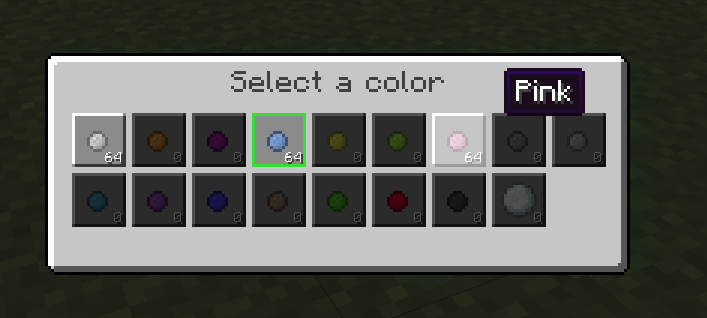
Middle-click a coloured AE2 block or cable to set the applicator to its colour. The snowball setting now also strips colour from GregTech machines and cables and from stained glass, panes and hardened clay. In creative mode the applicator has every colour without paint or power.
Shipped in: Applied-Energistics-2-Unofficial #998, Applied-Energistics-2-Unofficial #1002, Applied-Energistics-2-Unofficial #1576, Applied-Energistics-2-Unofficial #1591, Applied-Energistics-2-Unofficial #1607
ME Drive and Chest casing colour
A painted ME Drive or ME Chest now takes the colour on its casing, and the cells inside keep their own colours, so item, fluid and essentia cells stay easy to tell apart.
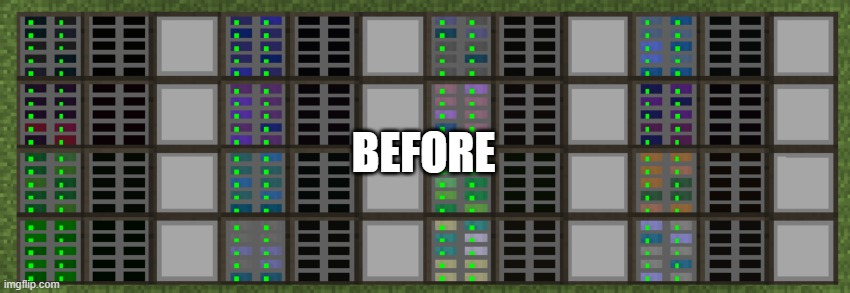
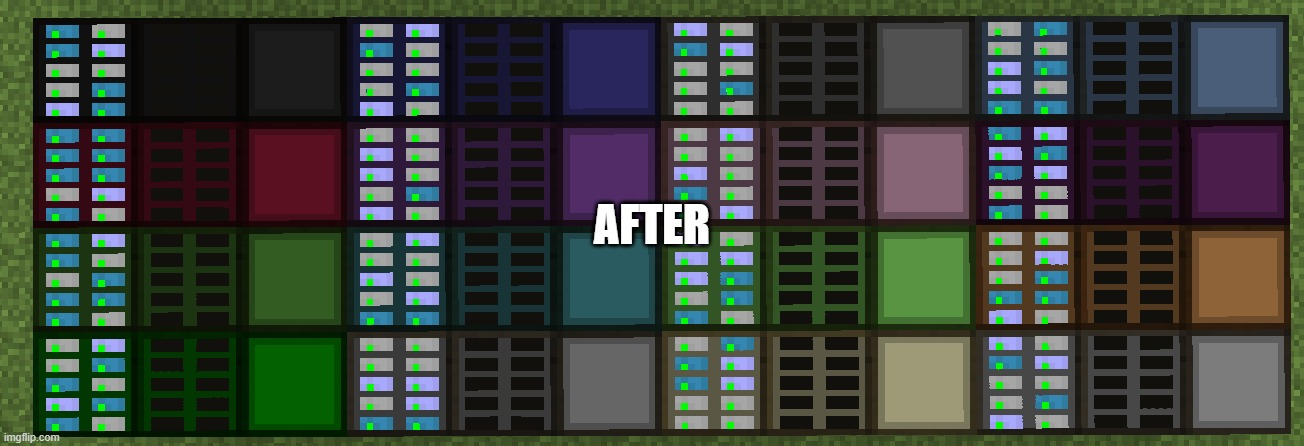
Shipped in: Applied-Energistics-2-Unofficial #988
Colored Controllers + Animations
Controllers can be painted in any of the 16 colours. A painted controller connects only to cables and controllers of its own colour or uncoloured ones.
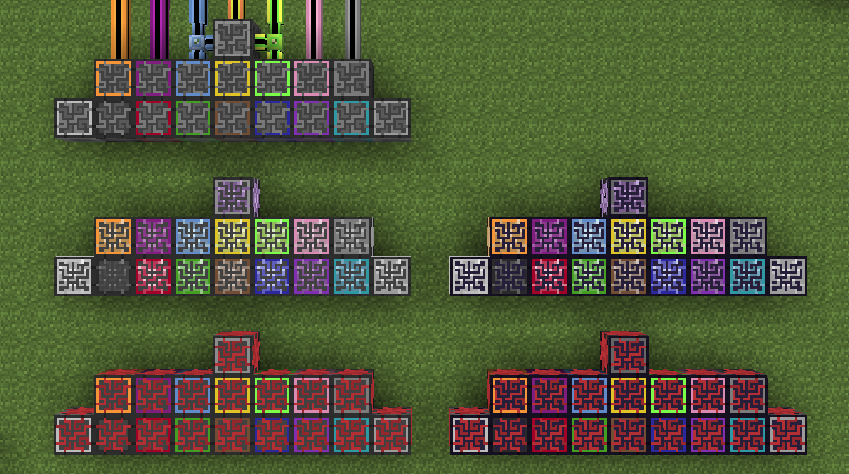
Each network also keeps its own light animation, chosen in the Network Tool's screen from eight: Original Rainbow, Wave, Counterflow, Core Ripple, Breathing, Soft Interference, Singularity and Circuit Trace. A new network starts on the placing player's default, set in AE2's client config or with the Cycle default controller animation key.
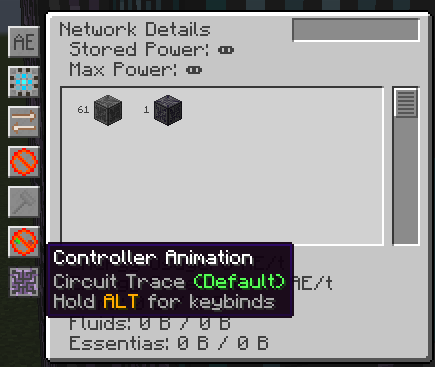
Shipped in: Applied-Energistics-2-Unofficial #1574, Applied-Energistics-2-Unofficial #1582, Applied-Energistics-2-Unofficial #1595
Tooltips, colour and a lot of small tidying
A Colorizer item sets a colour from RGB sliders or a hex code, and AE2's screens are then drawn in it: the backgrounds and the button frames, never the text, the items or the icons.
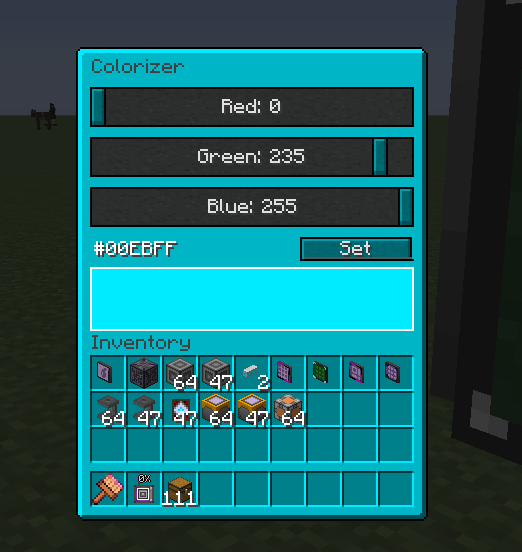
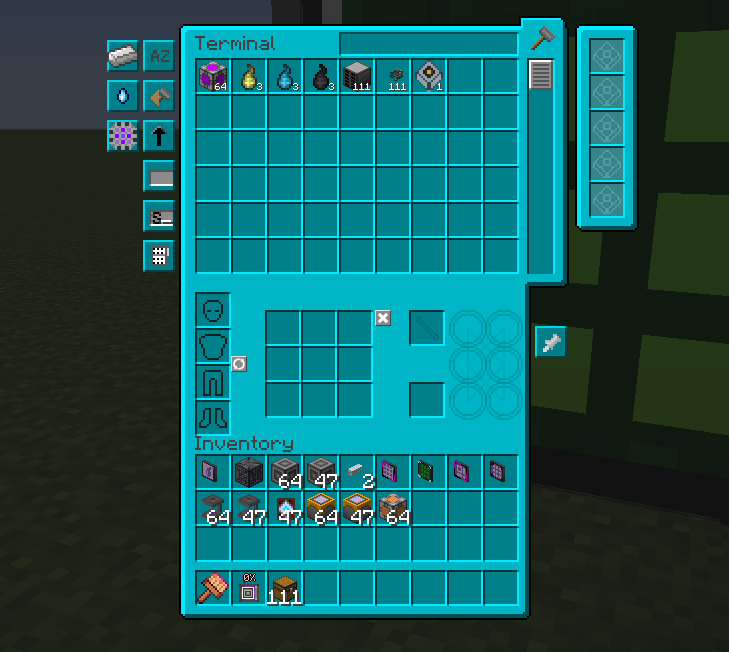
The colour is kept in AE2's client config, so it survives a restart and applies on every world and server you join from that game. It reaches the fluid addon's screens as well as AE2's own.
Around that: an empty upgrade slot lists which cards fit and how many, WAILA on a Quantum Bridge's link chamber shows where its other end is or that it is disconnected, and an amount field holding a formula shows what it works out to in a tooltip.
Shipped in 20 pull requests
- Add tinting to all AE2 GUI's (Applied-Energistics-2-Unofficial #1243)
- Delete redundant color call from lang files (Applied-Energistics-2-Unofficial #1341)
- Enhanced Network Status Bar (Applied-Energistics-2-Unofficial #1105)
- Improvement to hide button (Applied-Energistics-2-Unofficial #1408)
- Change Cable Sorting (Applied-Energistics-2-Unofficial #1090)
- Added line break to warning (Applied-Energistics-2-Unofficial #1074)
- Hide config slots if oredict filter is present (Applied-Energistics-2-Unofficial #1177)
- Improve the clarity of container interactions (Applied-Energistics-2-Unofficial #1060)
- Enchance tooltips (Applied-Energistics-2-Unofficial #1194)
- Add tooltip handler for upgrade slots (Applied-Energistics-2-Unofficial #1164)
- Fix upgrade card tooltip cells (Applied-Energistics-2-Unofficial #1176)
- Add QuantumBridge tooltip (Applied-Energistics-2-Unofficial #927)
- Display keybind key name in tooltips instead keybind name (Applied-Energistics-2-Unofficial #1366)
- Localization of Amount elements (Applied-Energistics-2-Unofficial #982)
- Add text length counter for oredict card GUI (Applied-Energistics-2-Unofficial #900)
- Fix: OreDictionaryFilter text field too short for long ore names (Applied-Energistics-2-Unofficial #1250)
- feat(level-emitter): add button to control detection mode on empty filter (Applied-Energistics-2-Unofficial #994)
- Show calculation result tooltips (Applied-Energistics-2-Unofficial #1190)
- Add component search to Network Status (Applied-Energistics-2-Unofficial #1649)
- Use vanilla tooltip renderer for Level Terminal buttons (AE2FluidCraft-Rework #476)
Storage Bus filters and fixes
A Storage Bus no longer forgets its ore-dictionary filter when the card is taken out and put back after a reload, and a change to its access mode or filter is no longer sometimes left unapplied. A read-write bus has a new Extraction Mode button: Loose, the old behaviour, lets the network see everything, and Strict shows only what passes the filter. An Ore Dictionary Filter Card greys out the bus's config slots. A Fluid Storage Bus can be wiped by crafting it on its own, like the item one, and its tooltip shows a preset priority.
Shipped in 14 pull requests
- Add priority in fluid storage bus tooltip (AE2FluidCraft-Rework #398)
- Fix storage bus not read fluid in configurated dual interface (AE2FluidCraft-Rework #415)
- Migrate storage bus config (AE2FluidCraft-Rework #420)
- allow to clear fluid storage bus settings (AE2FluidCraft-Rework #453)
- Fix storage bus crash and item NBT disappearance (Applied-Energistics-2-Unofficial #1019)
- Fix config copy for IO Bus, Storage Bus, and Level Emitter via memory card (Applied-Energistics-2-Unofficial #1049)
- Storage bus: make slots fadeout when oredict card is present (Applied-Energistics-2-Unofficial #1084)
- Fix smart partition works with different versions of storage bus (Applied-Energistics-2-Unofficial #1129)
- Fixes Storage Bus on empty container crash (Applied-Energistics-2-Unofficial #1148)
- Fix storage bus cache refresh recursion (Applied-Energistics-2-Unofficial #1395)
- Refactor storage bus game tests to use HorizonQA helpers (Applied-Energistics-2-Unofficial #1452)
- Fix storage bus cache reset downgrade (Applied-Energistics-2-Unofficial #1453)
- Fix bi-directional filters with storage bus + interface subnet (Applied-Energistics-2-Unofficial #991)
- Fix the storage-bus ore-filter persistence issue (Applied-Energistics-2-Unofficial #1512)
Performance
Removing a cable or a Quantum Network Bridge from a large network no longer stalls the server long enough to disconnect players: asking the network for one item's stock now queries that item instead of copying every cell's contents. The ME Terminal no longer re-sorts its list when only an amount changed, unless you sort by amount, and AE2FluidCraft's Level Maintainer reads stock from the network's cached list instead of querying it for every row every tick.
Interfaces remember for one tick that they are busy and what inventory sits next to them, which cuts the cost of many crafting CPUs competing for the same machines. Storage buses update their view of an inventory from the changes they see instead of rebuilding it on every poll. Cables render with less repeated lighting and texture work, a pattern that fails to decode is marked so the Interface Terminal stops re-reading it, and the Tree view of a very large crafting plan is about 2.5 times smaller, so it is no longer cut off.
Shipped in 34 pull requests
- Optimize cable rendering (Applied-Energistics-2-Unofficial #1567)
- Avoid redundant wireless connection restoration (Applied-Energistics-2-Unofficial #1553)
- Fix recipes created by late ore registrations (Applied-Energistics-2-Unofficial #1532)
- Cache enum
.values()(Applied-Energistics-2-Unofficial #1494) - Deduplicate objects in crafting tree serialization (Applied-Energistics-2-Unofficial #1436)
- Optimize powered insert/extract (Applied-Energistics-2-Unofficial #1391)
- Optimite Wireless-Hub connection logic (Applied-Energistics-2-Unofficial #1307)
- Enable 1-tick caching for InventoryAdaptors (Applied-Energistics-2-Unofficial #1293)
- Add 1-tick caching to DualityInterface.isBusy() to prevent repeated target scans within a single tick (Applied-Energistics-2-Unofficial #1290)
- Optimize IntegrationRegistry isEnabled() and getInstance() (Applied-Energistics-2-Unofficial #1289)
- Rewrite GridStorage data saving to not waste memory (Applied-Energistics-2-Unofficial #1232)
- optimize ASMIntegration (Applied-Energistics-2-Unofficial #1123)
- Use byte type for Stack Type network id (Applied-Energistics-2-Unofficial #1111)
- better performance (Applied-Energistics-2-Unofficial #1098)
- Improve Performance of NetworkInventoryHandler (Applied-Energistics-2-Unofficial #1096)
- Cache if pattern is invalid in NBT to fix performance issues (Applied-Energistics-2-Unofficial #1085)
- Cache pattern output stack (Applied-Energistics-2-Unofficial #1071)
- Less dumb Meteorite generation (Applied-Energistics-2-Unofficial #1065)
- fix performance regression when requesting new crafts (Applied-Energistics-2-Unofficial #1012)
- Reduce updates when recoloring cables (Applied-Energistics-2-Unofficial #954)
- Optimize p2p updates (Applied-Energistics-2-Unofficial #914)
- Use primitive item list when building the NetworkItemList (Applied-Energistics-2-Unofficial #893)
- Make ItemList's fuzzy data lazy-loading (Applied-Energistics-2-Unofficial #886)
- [help needed?] Remove simulated extract check for better performance (Applied-Energistics-2-Unofficial #885)
- Cache enum
.values()(AE2FluidCraft-Rework #459) - Cache enum
.values()(AE2FluidCraft-Rework #457) - Optimize Walrus (AE2FluidCraft-Rework #437)
- optimize terminal packet (AE2FluidCraft-Rework #431)
- Load walrus model only once (AE2FluidCraft-Rework #421)
- Avoid network scans in getAvailableItems (Applied-Energistics-2-Unofficial #1473)
- Reduce external inventory polling overhead (Applied-Energistics-2-Unofficial #1596)
- Fix ME terminal lag from re-sorting on every inventory update (Applied-Energistics-2-Unofficial #1665)
- perf(crafting): reduce repeated dispatch overhead (Applied-Energistics-2-Unofficial #1671)
- Avoid redundant stock lookups in ME Level Maintainer (AE2FluidCraft-Rework #474)
Under the hood
Game tests on HorizonQA now run the IO Port, import and export buses, storage buses, interfaces, P2P tunnels, drives, network power and autocrafting in a live world. A new Action Handler for GUI messages is meant to replace PacketValueConfig, which most screens still use. Constants and methods other mods asked for were exposed, and AE2FluidCraft followed AE2 through its stack type, slot rendering and GUI colour changes.
Shipped in 36 pull requests
- Add tests for IOPort redstone pulse mode (Applied-Energistics-2-Unofficial #1544)
- Add sticky tests (Applied-Energistics-2-Unofficial #1537)
- test: cover import bus with full network (Applied-Energistics-2-Unofficial #1496)
- Add energy acceptor game test using HorizonQA helpers and new structure (Applied-Energistics-2-Unofficial #1479)
- Increase drastically test coverage of E2E features (Applied-Energistics-2-Unofficial #1425)
- IOPort GameTests (Applied-Energistics-2-Unofficial #1335)
- Refactor/hqa update to v2 structures (Applied-Energistics-2-Unofficial #1467)
- add test stack for stack type (Applied-Energistics-2-Unofficial #1211)
- Expose some constants to the world (Applied-Energistics-2-Unofficial #1443)
- Expose addLinkedTarget (Applied-Energistics-2-Unofficial #1410)
- feat(cellinventory): expose isDistribution (Applied-Energistics-2-Unofficial #1407)
- Add Action handler (Applied-Energistics-2-Unofficial #1276)
- Allow Phantom Slots to use Sync Handler (Applied-Energistics-2-Unofficial #1317)
- Improve sync handler (Applied-Energistics-2-Unofficial #1305)
- Allow sync null able (Applied-Energistics-2-Unofficial #1184)
- avoid creating empty nbt tags by checking if the key is present first (Applied-Energistics-2-Unofficial #941)
- Set GTNHLib minimum version requirement appropriately (Applied-Energistics-2-Unofficial #1034)
- Disable integration when gt6 is present instead of failing loudly (Applied-Energistics-2-Unofficial #1353)
- Cleanup unused or invalid recipes (Applied-Energistics-2-Unofficial #1471)
- EquivalentEnergistics compatibility (Applied-Energistics-2-Unofficial #1227)
- restore some old integrations and remove dead integrations (Applied-Energistics-2-Unofficial #1274)
- fix(render): adapt hodgepodge fixBottomFaceUV (Applied-Energistics-2-Unofficial #940)
- partial uk_UA update/fix (Applied-Energistics-2-Unofficial #1066)
- Add en_US localization for the Terminal bauble type (Applied-Energistics-2-Unofficial #943)
- Fix FMP compatibility (AE2FluidCraft-Rework #444)
- Adapt to GUIColor changes (AE2FluidCraft-Rework #439)
- adapt (AE2FluidCraft-Rework #436)
- Fix a crash caused by cofhcore (AE2FluidCraft-Rework #408)
- remove cofhcore dep (AE2FluidCraft-Rework #403)
- fix storage name on exp (AE2FluidCraft-Rework #399)
- Fix primary gui (AE2FluidCraft-Rework #382)
- Adapt to AE2 slot rendering refactor (AE2FluidCraft-Rework #380)
- quick copy paste (AE2FluidCraft-Rework #341)
- Remove essentia terminal from ultra terminal recipe (AE2FluidCraft-Rework #402)
- Add generic type support for interface (AE2FluidCraft-Rework #407)
- Separated Fluid Interface fullblock vs part (AE2FluidCraft-Rework #426)
Fixes
Fixes across AE2 and AE2FluidCraft, mostly in autocrafting, the terminals, interfaces and GUI rendering. Among them are item duplication and item loss bugs, crashes, and problems with fluid handling, wireless terminals and P2P tunnels.
check your build - Applied-Energistics-2-Unofficial #953. The steps are on the Before you update page.
Shipped in 303 pull requests
- Fix FacadePart prevLight crash (Applied-Energistics-2-Unofficial #1573)
- Fix fluid network search highlighting (Applied-Energistics-2-Unofficial #1569)
- Add null check for renaming connected TileWirelessBase (Applied-Energistics-2-Unofficial #1566)
- Fix inverted fuzzy durability thresholds (Applied-Energistics-2-Unofficial #1564)
- Fix color applicator shift-right-click GUI (Applied-Energistics-2-Unofficial #1560)
- Fix crashes when diffing read-only network item lists (Applied-Energistics-2-Unofficial #1558)
- Fix shift + left click button drag in terminal (Applied-Energistics-2-Unofficial #1557)
- Fix Wireless Kit (Applied-Energistics-2-Unofficial #1551)
- Fix Mad Chameleon mode (Applied-Energistics-2-Unofficial #1550)
- Fix WirelessKit connection (Applied-Energistics-2-Unofficial #1548)
- Fix throughput monitor accuracy (Applied-Energistics-2-Unofficial #1543)
- Fixes cell workbench not clearing cell restrictions (Applied-Energistics-2-Unofficial #1540)
- Fix IOPort restone pulse mode (Applied-Energistics-2-Unofficial #1536)
- Fix negative idle crafting processor count (Applied-Energistics-2-Unofficial #1535)
- Fix terminal space-drag transfers (Applied-Energistics-2-Unofficial #1534)
- Fix item loss when pulling NEI bookmarks (Applied-Energistics-2-Unofficial #1533)
- fix: invalidate smart blocking after interface pushes (Applied-Energistics-2-Unofficial #1531)
- Fix network visualizer sneak click (Applied-Energistics-2-Unofficial #1530)
- fix npe issue with invalid pattern (Applied-Energistics-2-Unofficial #1528)
- fix: annotate AE2FC compatibility test require ae2fc to be present (Applied-Energistics-2-Unofficial #1517)
- fix: reject crafted items when export target is missing (Applied-Energistics-2-Unofficial #1516)
- Fix repeated ore filter operands (Applied-Energistics-2-Unofficial #1515)
- Fix the storage-bus ore-filter persistence issue (Applied-Energistics-2-Unofficial #1512)
- fix: validate Fluix output capacity (Applied-Energistics-2-Unofficial #1511)
- fix: charge power for fluid container transfers (Applied-Energistics-2-Unofficial #1504)
- Preserve orphaned Interface P2P buffers (Applied-Energistics-2-Unofficial #1503)
- Fix Interface P2P drop ownership (Applied-Energistics-2-Unofficial #1502)
- Probably more thread safe (Applied-Energistics-2-Unofficial #1501)
- Fix pattern scrolling in interfaces (Applied-Energistics-2-Unofficial #1499)
- Fix crafting CPU button name overflow (Applied-Energistics-2-Unofficial #1495)
- Fix blocking mode not ignoring ignored items when accessing an inventory indirectly (Applied-Energistics-2-Unofficial #1493)
- fix: use renderViewEntity for camera math (Applied-Energistics-2-Unofficial #1492)
- fix: Use renderViewEntity in NetworkVisualizer (Applied-Energistics-2-Unofficial #1489)
- Fix AE2 cable placement preview ignoring colour of GridHosts (Applied-Energistics-2-Unofficial #1486)
- Fix essentia patterns being marked as type mismatch (Applied-Energistics-2-Unofficial #1485)
- Fix Spatial IO transfers into unloaded chunks (Applied-Energistics-2-Unofficial #1482)
- Fix energy cell tooltip ignoring the power usage multiplier (Applied-Energistics-2-Unofficial #1478)
- Fix unconfigured ore filter cards using hidden filters (Applied-Energistics-2-Unofficial #1477)
- Harden negative inputs and fix issue with loop (Applied-Energistics-2-Unofficial #1476)
- use decrStackSize to pull from unknown IInventory (Applied-Energistics-2-Unofficial #1474)
- Fix crafting cpu mouse over offset (Applied-Energistics-2-Unofficial #1461)
- Fix pattern optimization through pattern repeaters (Applied-Energistics-2-Unofficial #1458)
- actually make ME drives, ME chests & IO ports brown & not green (Applied-Energistics-2-Unofficial #1454)
- Fix MultiCraftingTracker getting stuck on failed crafting jobs (Applied-Energistics-2-Unofficial #1441)
- Fix skipped shift-clicks when dragging with Mouse Tweaks (Applied-Energistics-2-Unofficial #1439)
- fix(cellworkbench): fix copy mode by caching previous cell type (Applied-Energistics-2-Unofficial #1435)
- Fix memory card interaction on tile block (Applied-Energistics-2-Unofficial #1434)
- Fix item duplication with mutating inventories (Applied-Energistics-2-Unofficial #1433)
- Fix Crafting Plan Icon (Applied-Energistics-2-Unofficial #1429)
- Fix quartz fiber power cache after grid changes (Applied-Energistics-2-Unofficial #1427)
- More placement fixes (Applied-Energistics-2-Unofficial #1423)
- Fix keybind to show recipe/usage for encoded patterns (Applied-Energistics-2-Unofficial #1422)
- Don't open gui for interaction event (Applied-Energistics-2-Unofficial #1421)
- Fix fake crafting (Applied-Energistics-2-Unofficial #1413)
- Fix wireless serial not saved (Applied-Energistics-2-Unofficial #1412)
- Only update network visualiser from selected slot (Applied-Energistics-2-Unofficial #1411)
- Fix several bugs related to missing item & emitable crafts (Applied-Energistics-2-Unofficial #1405)
- Wireless hub/connector fixes (Applied-Energistics-2-Unofficial #1400)
- prevent gl color state contamination (Applied-Energistics-2-Unofficial #1394)
- fix Crafting failure no feedback (Applied-Energistics-2-Unofficial #1393)
- Fix multi-type storage cells not showing contents in tooltip (Applied-Energistics-2-Unofficial #1388)
- Fix export bus cache (Applied-Energistics-2-Unofficial #1385)
- Fix filling containers (Applied-Energistics-2-Unofficial #1383)
- Fix 1k Crafting Storage shown as Singularity Crafting Storage (Applied-Energistics-2-Unofficial #1381)
- Fix crafting storage rendering (Applied-Energistics-2-Unofficial #1380)
- fix blocking mode fix incorrect reason (Applied-Energistics-2-Unofficial #1374)
- fix reshuffler not getting registered when channels are disabled (Applied-Energistics-2-Unofficial #1371)
- Fix smart blocking mode on full-block interfaces (Applied-Energistics-2-Unofficial #1369)
- Fix FMP compatibility (Applied-Energistics-2-Unofficial #1368)
- Fix part placement (Applied-Energistics-2-Unofficial #1365)
- Fix pattern terminal slots sync (Applied-Energistics-2-Unofficial #1364)
- Fix fluid rendering (Applied-Energistics-2-Unofficial #1360)
- fix world server leak caused by InventoryAdaptor cache (Applied-Energistics-2-Unofficial #1358)
- Fix MEItemIO (Applied-Energistics-2-Unofficial #1354)
- Fix part preview using different ray trace than placement (Applied-Energistics-2-Unofficial #1352)
- Fix reusable substituted tools in crafting calculation (Applied-Energistics-2-Unofficial #1351)
- Fix IOPort crash (Applied-Energistics-2-Unofficial #1350)
- Fix the CPU Active color (Applied-Energistics-2-Unofficial #1344)
- fix wireless waila power draw (Applied-Energistics-2-Unofficial #1339)
- Fix Pattern Repeater StackOverflow with loops (Applied-Energistics-2-Unofficial #1338)
- fixes Wireless Manager (Applied-Energistics-2-Unofficial #1336)
- fix Wireless connector lose custom name on migration (Applied-Energistics-2-Unofficial #1334)
- Fix pattern repeater CME (Applied-Energistics-2-Unofficial #1332)
- Fix GuiColorizer button appearance (Applied-Energistics-2-Unofficial #1331)
- fix Ghost patterns from recursive (Applied-Energistics-2-Unofficial #1329)
- Fix PacketPatternValueSet (Applied-Energistics-2-Unofficial #1328)
- add keybinds for wireless keys (Applied-Energistics-2-Unofficial #1318)
- Fix Amode Wireless Kit Crash (Applied-Energistics-2-Unofficial #1315)
- fix WirelessKit Advanced mode Line mode binding was 1 block shorter than expected (Applied-Energistics-2-Unofficial #1313)
- fix forge event action performed not triggered (Applied-Energistics-2-Unofficial #1312)
- fix WirelessKit config manager not read nbt correct (Applied-Energistics-2-Unofficial #1311)
- Fix Wireless Connector power usage (Applied-Energistics-2-Unofficial #1306)
- Fix NPE in getAdaptor (Applied-Energistics-2-Unofficial #1303)
- fix Incorrect item usage when shift crafting in crafting terminal (Applied-Energistics-2-Unofficial #1301)
- Fix simulate false positive on some cases (Applied-Energistics-2-Unofficial #1299)
- Fix AE2 spatial corrupting gt5 machines (Applied-Energistics-2-Unofficial #1292)
- Fix NEI recipe display (Applied-Energistics-2-Unofficial #1288)
- fix Crafting output can mismatch stacksize (Applied-Energistics-2-Unofficial #1286)
- Fix conversion monitor (Applied-Energistics-2-Unofficial #1283)
- Fix issues with ItemIO implementation (Applied-Energistics-2-Unofficial #1282)
- fix Cell Restriction gui type weight incorrect (Applied-Energistics-2-Unofficial #1281)
- fix (Applied-Energistics-2-Unofficial #1279)
- fix Some blocks texture location (Applied-Energistics-2-Unofficial #1273)
- Move quartz glass to core (Applied-Energistics-2-Unofficial #1272)
- fix Render fluid in terminal crash (Applied-Energistics-2-Unofficial #1267)
- fix blocking mode gt hatches (Applied-Energistics-2-Unofficial #1263)
- clear view helper player on each dimension change (Applied-Energistics-2-Unofficial #1262)
- fix (Applied-Energistics-2-Unofficial #1260)
- Fix io port cell movement (Applied-Energistics-2-Unofficial #1259)
- fix shift crafting nbt (Applied-Energistics-2-Unofficial #1256)
- Fix gui closed when inv keybind pressed while text field in focus (Applied-Energistics-2-Unofficial #1255)
- Make sure during fuzzy crafting we can fulfill pattern (Applied-Energistics-2-Unofficial #1253)
- Fix item insertion into parts on different sides (Applied-Energistics-2-Unofficial #1251)
- Fix importing items getting their types squashed (Applied-Energistics-2-Unofficial #1245)
- Fix config change not updating neighbors (Applied-Energistics-2-Unofficial #1244)
- Fix blank pattern extraction from network when encoding (Applied-Energistics-2-Unofficial #1242)
- Fix EU P2P not converting EU to RF for RF machines (Applied-Energistics-2-Unofficial #1241)
- Fixed the viewport area (Applied-Energistics-2-Unofficial #1240)
- Fix crafting completion sound broadcasting to all nearby players (Applied-Energistics-2-Unofficial #1239)
- Update DualityInterface.java (Applied-Energistics-2-Unofficial #1238)
- Prevent crafting by machines from being merged (Applied-Energistics-2-Unofficial #1234)
- Fix Overflow Void Card only voids when cell is full (Applied-Energistics-2-Unofficial #1233)
- Fix delayed missing-mode crafting retries (Applied-Energistics-2-Unofficial #1231)
- fix Pattern with recycling ingredient broken (Applied-Energistics-2-Unofficial #1230)
- Fix pattern terminal shift-click ghosts (Applied-Energistics-2-Unofficial #1226)
- Fix buffered leading spaces in terminal search (Applied-Energistics-2-Unofficial #1217)
- Fix shift click in phantom slot (Applied-Energistics-2-Unofficial #1213)
- Fix crafting tree counts for mixed recipes (Applied-Energistics-2-Unofficial #1212)
- Hide scheduling button in import bus GUI (Applied-Energistics-2-Unofficial #1207)
- Fix Conversion Monitor NPE (Applied-Energistics-2-Unofficial #1206)
- Fix StackOverflowError in P2P Interface updateCraftingList (Applied-Energistics-2-Unofficial #1205)
- Fix sync condition (Applied-Energistics-2-Unofficial #1204)
- Fix changes not saved in some blocks (Applied-Energistics-2-Unofficial #1203)
- Fix Quantum Bridge renaming cause NPE in unformed clusters (Applied-Energistics-2-Unofficial #1202)
- Fix crafting plan percentage rounding (Applied-Energistics-2-Unofficial #1201)
- Fix/merge remaining count (Applied-Energistics-2-Unofficial #1199)
- Fix IO Port cell moving (Applied-Energistics-2-Unofficial #1197)
- Fix server memory leak in LocatableRegistry (Applied-Energistics-2-Unofficial #1193)
- Fix ae2 leaving empty NBT Tags everywhere (Applied-Energistics-2-Unofficial #1191)
- Override PowerEvent in TileEnergyAcceptor so it notifies the grid when receiving power (Applied-Energistics-2-Unofficial #1188)
- Fix Multiplier&Divider infinite loop (Applied-Energistics-2-Unofficial #1185)
- Fix NEI Cell and Pattern View stackSize (Applied-Energistics-2-Unofficial #1175)
- fix GuiCraftingCPU#filteredVisual not being cleared properly (Applied-Energistics-2-Unofficial #1172)
- fix ore dict view cell (Applied-Energistics-2-Unofficial #1170)
- fix portable cells (Applied-Energistics-2-Unofficial #1168)
- Fix fuzzy lookup with primitive-backed network list (Applied-Energistics-2-Unofficial #1163)
- fix search alt stacks when nei cant provide item (Applied-Energistics-2-Unofficial #1159)
- Fix null key in legacy craftable map (Applied-Energistics-2-Unofficial #1149)
- Adjusts ME Pick Block to prefer PickBlockEvent when appropriate (Applied-Energistics-2-Unofficial #1141)
- Fix fill containers interaction (Applied-Energistics-2-Unofficial #1140)
- fix NPE in AEFluidStackType#drainStackFromContainer (Applied-Energistics-2-Unofficial #1139)
- fix standart search isnt standart (Applied-Energistics-2-Unofficial #1134)
- Fixes & improvements fuzzy interface config (Applied-Energistics-2-Unofficial #1131)
- terminal performance fixes (Applied-Energistics-2-Unofficial #1128)
- Fluid transfer io port speed fix (Applied-Energistics-2-Unofficial #1108)
- Fix Security Terminal Gui (Applied-Energistics-2-Unofficial #1104)
- fix texture (Applied-Energistics-2-Unofficial #1103)
- Fix item name localization on dedicated server (Applied-Energistics-2-Unofficial #1102)
- fix AE Follow craft disconnect the client sometime (Applied-Energistics-2-Unofficial #1101)
- fix toggle focus (Applied-Energistics-2-Unofficial #1100)
- Fix crafting results being voided when unable to inject into network (Applied-Energistics-2-Unofficial #1099)
- Fix essentia not being pushed to network via interface (Applied-Energistics-2-Unofficial #1095)
- fix NPE in DualityInterface#addDrops (Applied-Energistics-2-Unofficial #1094)
- fix server crash introduced by PR#1089 (Applied-Energistics-2-Unofficial #1092)
- Improve pin slot interaction and fix ghost item (Applied-Energistics-2-Unofficial #1091)
- fix keyBindPickBlock in terminals (Applied-Energistics-2-Unofficial #1088)
- fix npe on addon (Applied-Energistics-2-Unofficial #1087)
- Fix final output when fake crafting (Applied-Energistics-2-Unofficial #1083)
- Fix pattern view for exotic stacks, fix pattern tooltips which containt super exotic stack and gt present (Applied-Energistics-2-Unofficial #1081)
- avoid passing null to isItemValidForSlot (Applied-Energistics-2-Unofficial #1080)
- fix(gui): ensure null filters are synced to client. (Applied-Energistics-2-Unofficial #1075)
- Fix storage search chat names localization (Applied-Energistics-2-Unofficial #1073)
- Fix crafting status tooltip (Applied-Energistics-2-Unofficial #1068)
- Fix crash on patterns containing unsupported types (Applied-Energistics-2-Unofficial #1063)
- fix put stuff in hidden pins (Applied-Energistics-2-Unofficial #1062)
- compatibility (Applied-Energistics-2-Unofficial #1061)
- Fixes (Applied-Energistics-2-Unofficial #1058)
- Fix multi-interface smart blocking (smart UAAL automation) (Applied-Energistics-2-Unofficial #1055)
- Move AE2 pick-block block select logic to client-side. (Applied-Energistics-2-Unofficial #1045)
- fix typos (Applied-Energistics-2-Unofficial #1044)
- Don't add items to pattern with shift click on Pattern Terminal (Applied-Energistics-2-Unofficial #1043)
- fix pins r click, fix processing term (Applied-Energistics-2-Unofficial #1042)
- fix me chest (Applied-Energistics-2-Unofficial #1040)
- Correction of the ME Chest name in the pt-br language (Applied-Energistics-2-Unofficial #1039)
- feat: Use pylon dimension for SpatialTransition instead of IO-Port (Applied-Energistics-2-Unofficial #1038)
- Change the priority of destination slots when shift-clicking on Terminal GUI and inventory not updated (Applied-Energistics-2-Unofficial #1032)
- Fix partition button not work on Cell Workbench (Applied-Energistics-2-Unofficial #1029)
- Fix fluids not displayed in optimize gui (Applied-Energistics-2-Unofficial #1028)
- Fix shift-clicking a slot unnecessarily placing items in phantom slot (Applied-Energistics-2-Unofficial #1027)
- Fix optimizer gui not open (Applied-Energistics-2-Unofficial #1023)
- Fix highlight interface was not working sometimes (Applied-Energistics-2-Unofficial #1022)
- Return shift click insert into phantom slots (Applied-Energistics-2-Unofficial #1021)
- Fix processing terminal buttons position (Applied-Energistics-2-Unofficial #1018)
- Fix pattern optimizer crash (Applied-Energistics-2-Unofficial #1017)
- Fix negative amount button (Applied-Energistics-2-Unofficial #1016)
- fix item buses does not update redstone mode when gui changes (Applied-Energistics-2-Unofficial #1013)
- Fix color applicator gui not reporting properly colors (Applied-Energistics-2-Unofficial #1009)
- Fix tooltip details showing the details of previously hovered item instead of currently hovered one (Applied-Energistics-2-Unofficial #1008)
- Do not close the crafting cpu screen if there's no block to highlight (Applied-Energistics-2-Unofficial #1007)
- Fix colored +/- amount buttons not updating value when colored (Applied-Energistics-2-Unofficial #997)
- do not push in inactive interface (Applied-Energistics-2-Unofficial #995)
- fix crafting mode for processing pattern terminal (Applied-Energistics-2-Unofficial #989)
- fix crash, fix encoded pattern overwrite (Applied-Energistics-2-Unofficial #987)
- fix crash without ae2fc (Applied-Energistics-2-Unofficial #983)
- Fix crafting gui open in non-hand slot (Applied-Energistics-2-Unofficial #981)
- Fix NEI Cell View stack size rendering (Applied-Energistics-2-Unofficial #979)
- Fix amount to send calculation for fluids (Applied-Energistics-2-Unofficial #978)
- Do not allow put multi parts in cable with bus & do not allow put bus in multi part te (Applied-Energistics-2-Unofficial #977)
- Fix crafting gui transition (Applied-Energistics-2-Unofficial #976)
- Fix the Cutting Knife check (Applied-Energistics-2-Unofficial #975)
- Fix Universal Terminal not loading pattern when changing pattern output slot (Applied-Energistics-2-Unofficial #972)
- Fix primary gui (Applied-Energistics-2-Unofficial #971)
- Refactor slot rendering and fix items not appearing while dragging (Applied-Energistics-2-Unofficial #970)
- Fix Network Status Gui not open (Applied-Energistics-2-Unofficial #967)
- Ug fixes 2 (Applied-Energistics-2-Unofficial #965)
- Fix fake slot (Applied-Energistics-2-Unofficial #964)
- Correct fluid amount for NEI (Applied-Energistics-2-Unofficial #963)
- Fix fluid cell interaction (Applied-Energistics-2-Unofficial #962)
- ug fixes (Applied-Energistics-2-Unofficial #960)
- Fix wrong substitutes used in crafting calculation [check your build] (Applied-Energistics-2-Unofficial #953)
- Don't unfocus text field on GuiAmount (Applied-Energistics-2-Unofficial #947)
- Fix mergeJob return wrong crafting link (Applied-Energistics-2-Unofficial #933)
- Have
AdaptorItemIO.removeItemsbetter reflectsimulateRemove(Applied-Energistics-2-Unofficial #931) - fix empty storage list returned when ME interface is configured with something (Applied-Energistics-2-Unofficial #928)
- Fix NPE (Applied-Energistics-2-Unofficial #924)
- Add more info to error log (Applied-Energistics-2-Unofficial #919)
- Fix interface passing network contents when missing channel (Applied-Energistics-2-Unofficial #918)
- fix cell restriction math (Applied-Energistics-2-Unofficial #917)
- Fix sticky inventories break priority loop (Applied-Energistics-2-Unofficial #915)
- Fix/p2p bind doesn't copy stocking settings (Applied-Energistics-2-Unofficial #913)
- Fix/p2p desync when saving an input to memory card again (Applied-Energistics-2-Unofficial #912)
- Fix dupe bug for p2p interface (Applied-Energistics-2-Unofficial #907)
- Avoid Triple (Applied-Energistics-2-Unofficial #895)
- Fix conduit is connected check, retrieve blocking behavior for fluid interface, 2.9 (Applied-Energistics-2-Unofficial #894)
- Fix advanced blocking card doesn't work on load (Applied-Energistics-2-Unofficial #891)
- Fix AutoFiller/SuperStocking/etc lags (Applied-Energistics-2-Unofficial #890)
- Quick fix oc (Applied-Energistics-2-Unofficial #888)
- fix nbt read/write in legacy style 2.9 (Applied-Energistics-2-Unofficial #876)
- fix packets spliting (Applied-Energistics-2-Unofficial #873)
- fix craft when no ae2fc (Applied-Energistics-2-Unofficial #871)
- Fix interface fluid push (Applied-Energistics-2-Unofficial #870)
- Fix/fuzzy export bus can only export 1 item from its configured slots (Applied-Energistics-2-Unofficial #868)
- Fix/inconsistent network read order (Applied-Energistics-2-Unofficial #867)
- Fix CreativeCellInventory#getAvailableItem returns wrong count (Applied-Energistics-2-Unofficial #866)
- fix: crash when check crafting CPU (Applied-Energistics-2-Unofficial #864)
- Fix path for invTweaks config. make me chets notify when internal handler ready (Applied-Energistics-2-Unofficial #863)
- Fix oreDict field in the magnet card filter (AE2FluidCraft-Rework #464)
- Fix fluid transfer through inactive interfaces (AE2FluidCraft-Rework #462)
- Fix universal terminal selection (AE2FluidCraft-Rework #461)
- Fix fluid packet orientation when rendered as an entity (AE2FluidCraft-Rework #460)
- Level Terminal fixes (AE2FluidCraft-Rework #455)
- Fix ME Fluid Interface not requesting crafting for missing fluids (AE2FluidCraft-Rework #452)
- Fix universal terminal mode sync in baubles (AE2FluidCraft-Rework #451)
- Fix fluid auto filler crash (AE2FluidCraft-Rework #445)
- Fix crash when draining Certus Quartz Tank with Large Steel Fluid Cell (AE2FluidCraft-Rework #438)
- Fix item config blocking fluid interface (AE2FluidCraft-Rework #423)
- Fix dual interface returning internal fluids only once (AE2FluidCraft-Rework #422)
- fix: remove redundant tooltip in itemBlock (AE2FluidCraft-Rework #419)
- fix: ensure fluid packets drop when part is broken (AE2FluidCraft-Rework #418)
- fix: correct error in TileFluidPacketDecoder closeInventory (AE2FluidCraft-Rework #414)
- Fix crash when trying to open wireless magnet filter when terminal in baubles (AE2FluidCraft-Rework #404)
- Fix storage name fluid emitter (AE2FluidCraft-Rework #400)
- Fix some typos (AE2FluidCraft-Rework #397)
- Fix stock replenisher item voiding (AE2FluidCraft-Rework #396)
- Use bigger inventory (AE2FluidCraft-Rework #395)
- Fix replenisher void (AE2FluidCraft-Rework #394)
- Revert part of "remove transformers (#389)" (AE2FluidCraft-Rework #393)
- fix NPE when trying to drain a tank in a tank tower (AE2FluidCraft-Rework #390)
- remove transformers (AE2FluidCraft-Rework #389)
- fix certus tank update spam 2.8 2.9 (AE2FluidCraft-Rework #385)
- Fix import/export bus issues (AE2FluidCraft-Rework #384)
- fix draining simulation actually perform drain (AE2FluidCraft-Rework #383)
- Fix universal terminal mode switch in baubles slot (AE2FluidCraft-Rework #378)
- replenisher fixes, 2.8 2.9 (AE2FluidCraft-Rework #373)
- Resolves Multi-Fluid Distribution Limit Check Only Evaluating First 5 Partition Slots (AE2FluidCraft-Rework #362)
- Fix/p2p bind doesn't copy stocking settings (AE2FluidCraft-Rework #354)
- Fix/p2p desync when saving an input to memory card again (AE2FluidCraft-Rework #353)
- Fix dupe bug for dual p2p interface (AE2FluidCraft-Rework #352)
- Fix advanced blocking card doesn't work on load (AE2FluidCraft-Rework #342)
- Network Visualiser fixes (Applied-Energistics-2-Unofficial #1345)
- Fix single-fluid cell contents tooltip (AE2FluidCraft-Rework #465)
- Fix wireless level terminal bauble navigation (AE2FluidCraft-Rework #468)
- Fix Annihilation Plane crash when loading Forge Multipart cable buses (Applied-Energistics-2-Unofficial #1577)
- fix: creative essentia appearance of existance (Applied-Energistics-2-Unofficial #1603)
- fix multipart host bindings and placement validation (Applied-Energistics-2-Unofficial #1611)
- Fixed a bug in submitting jobs #26770 (Applied-Energistics-2-Unofficial #1614)
- Improve tick rate on stuck interfaces (Applied-Energistics-2-Unofficial #1624)
- block fluidstack being cast to itemstack caused err (Applied-Energistics-2-Unofficial #1625)
- Fix blocking mode ignoring the contents of the fluid P2Ps destination (Applied-Energistics-2-Unofficial #1629)
- Exclude void cells from storage type statistics (Applied-Energistics-2-Unofficial #1648)
- ignore format codes when sorting by name (Applied-Energistics-2-Unofficial #1656)
- Fix Advanced Network Tool slots overflowing in Inscriber and Crystal Growth Chamber (Applied-Energistics-2-Unofficial #1640)
- fix(middle-click): Prevent middle click craft when an item is picked up by the player (Applied-Energistics-2-Unofficial #1660)
- Fix inventory scrollbar's drag state after mouse release (Applied-Energistics-2-Unofficial #1666)
- Prevent inactive GT EU P2P outputs from injecting energy (Applied-Energistics-2-Unofficial #1667)
- Fix pattern terminal focus (Applied-Energistics-2-Unofficial #1673)
- Fix NEI search overlays rendering on hidden slots (Applied-Energistics-2-Unofficial #1674)
- Fix NEI recipe transfer for wildcard metadata ingredients (Applied-Energistics-2-Unofficial #1676)
- Fix Advanced Inscriber crash with IC2 (Applied-Energistics-2-Unofficial #1677)
- Fix NullPointerException when right-clicking a sound p2p with advance... (BetterP2P #47)
- Fix: set worked flag for essential import bus (ThaumicEnergistics #143)
- Fix Arcane Assembler dividing by zero on patterns with a zero-size ingredient (Warded Glass) (ThaumicEnergistics #144)
- fix: refresh provider connections when changing color (ThaumicEnergistics #145)
Contributors
Everyone who authored, reviewed or co-authored a change on this page, with how many of them:
@Kogepan229 (435), @lc-1337 (289), @Dream-Master (231), @Worive (66), @UltraProdigy (59), @Ranzuu (43), @Eldrinn-Elantey (36), @hiroscho (28), @Alexdoru (27), @boubou19 (26), @AnsonYeung (22), @Nana-Sakura (10), @zyf051520 (10), @danyadev (9), @Luca-Guettinger (9), @Pxx500 (9), @Nikolay-Sitnikov (8), @ABKQPO (7), @Angry3vilbot (7), @DreamYao520 (7), @asquared31415 (6), @bk5115545 (6), @evgengoldwar (6), @koolkrafter5 (6), @micvog (6), @serenibyss (6), @ShadowQFT (6), @slprime (6), @Caedis (5), @Guvante (5), @hinyb (5), @MCTBL (5), @sisyphussy (5), @Yoshy2002 (5), @Algent (4), @daxsc (4), @Inphysible (4), @kuba6000 (4), @mitchej123 (4), @PLASMAchicken (4), @RecursivePineapple (4), @rieverholic (4), @Sanduhr32 (4), @CaelixOrbit (3), @chrombread (3), @czqwq (3), @DarkShadow44 (3), @EnderProyects (3), @Ethryan (3), @Glease (3), @leagris (3), @LewisSaber (3), @MalTeeez (3), @NeOzay (3), @vermz99 (3), @copilot-pull-request-reviewer (2), @cubefury (2), @FabienChatton (2), @iouter (2), @ko-lja (2), @Litten95 (2), @michaeldoylecs (2), @OTPANNIEXD (2), @PantACRO4life (2), @Redderpears (2), @Ressed (2), @Ruling-0 (2), @sbancuz (2), @shironakoushi (2), @Spicierspace153 (2), @WhyDoLogic (2), @WhyDoLogic2 (2), @alppp (1), @AshVz (1), @asukaonly (1), @Azusfin (1), @Breviel (1), @Chitak985 (1), @chochem (1), @Copilot (1), @DennisOrtin (1), @dfddgge (1), @eigenraven (1), @Elios5014 (1), @Engineer12798 (1), @felixfour (1), @FourIsTheNumber (1), @Gamingb3ast (1), @gaogao-qwq (1), @GDCloudstrike (1), @Goldenlion5648 (1), @GreatBrandon (1), @GribanovIvan (1), @guusw (1), @iR3turnZ (1), @jamiehu427 (1), @JeromeBollinger (1), @Jesse-njx (1), @Justxs (1), @kirilwapj (1), @Ktmi (1), @Kynake (1), @LazyFlesh (1), @lynxx131 (1), @Majora320 (1), @MarkinoTeck (1), @MarloGr (1), @mattiasploesch-cpu (1), @Miklebe (1), @nmgix (1), @OneEyeMaker (1), @PinkYuDeer (1), @przemo1232 (1), @querns (1), @rhobold (1), @S4mpsa (1), @samhaines-wustl (1), @Sheodar (1), @SST-03 (1), @Stars-27 (1), @starxingchenc (1), @SuperSoupr (1), @thiago-solfo (1), @tiffit (1), @unix-supremacist (1), @XSana (1), @youkoaona (1)